







Streamline Your Tax Workflow with SmartVault’s Drake Software Integration
Why SmartVault + Drake Software?

Secure Cloud Storage
SmartRouting
eSignature Integration
Connected Desktop
Unmatched Reliability
Watch how SmartRouting simplifies your tax workflow in Drake Software
SmartVault’s Connected Desktop provides a familiar interface for Drake users, similar to Drake Documents, but with enhanced organization.

Let’s Map Your Firm’s Workflow Together.
- 15-minute discovery call, on your calendar
- A live look at the workflow for your firm size
- Straightforward pricing and migration options
"*" indicates required fields
SmartRouting in Action
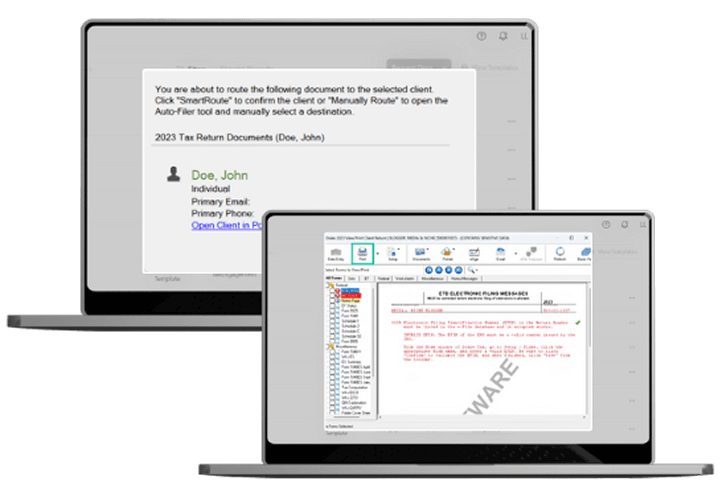
SmartVault’s SmartRouting automates document filing directly from Drake Software, ensuring that client documents are stored in the correct folders without manual effort.
How SmartRouting Works in Drake Software:
- Select the client and document(s) in Drake Software.
- Click Print and choose SmartVault PDF Printer.
- SmartRouting automatically matches the client and routes the document to the appropriate folder in SmartVault.
- If needed, manually adjust routing for specific documents.
Simple. Secure. Smart.
Automate filing, simplify signatures, and securely collaborate while streamlining every step of the tax prep process.


Upload & Organize

SmartRouting

eSignature Collection

Secure Sharing

Carolle Ryan
Owner – Liberty Tax Service
Have Questions? We’ve Got Answers.
Common questions about the Drake + SmartVault integration, security, and migration.
-
What DMS options work with Drake Software?
Drake Software comes with its own built-in document storage, Drake Documents, but many firms pair it with a dedicated DMS like SmartVault for more automation and accessibility. SmartVault integrates directly with Drake Software through SmartRouting, automatically filing documents into the correct client folders when printed from Drake, and adds features like eSignature collection and secure client sharing on top.
-
Is Drake Documents enough, or do I need a separate DMS?
Drake Documents provides basic document storage within Drake Software, but firms looking for more automation, cloud accessibility, or client-facing tools often add a dedicated DMS. SmartVault’s Connected Desktop offers a similar, familiar interface to Drake Documents but with enhanced organization, plus automated routing, eSignature, and secure sharing that Drake Documents doesn’t include on its own.
-
Is SmartVault a document management system for Drake Software?
Yes. SmartVault integrates with Drake Software to give tax professionals a full DMS layer on top of their existing workflow. It uses SmartRouting to automatically file documents printed from Drake into the correct client folders, and includes secure cloud storage with bank-grade encryption, eSignature collection for forms like 8878/8879, and a branded client portal for sharing finalized returns.
-
What's the difference between SmartVault and Drake Documents?
SmartVault’s Connected Desktop is designed to feel familiar to Drake Documents users, but adds capabilities beyond basic storage: SmartRouting automates filing directly from Drake Software, built-in eSignature lets firms collect legally binding signatures on returns and engagement letters, and a custom-branded client portal enables secure document sharing while maintaining IRS and FTC compliance. SmartVault is also built for 100% uptime, even during peak tax season.
-
What should firms compare when choosing a DMS for Drake Software?
Firms evaluating DMS options for Drake Software typically look at how well the system automates filing versus requiring manual organization, whether it offers a client-facing portal for secure document sharing, whether it includes eSignature collection for tax forms and engagement letters, how reliable the platform is during peak tax season, and how closely it integrates with Drake Software itself. SmartVault is built to address each of these directly, using SmartRouting, built-in eSignature, and a branded client portal alongside its Drake Software integration.