








The only document management and client portal built into Intuit Lacerte.

Key Benefits for Lacerte Users
Five ways SmartVault transforms tax prep inside Intuit Lacerte.
1-Click Integration
SmartVault connects directly to Lacerte, so client data moves between the two in one click and every return files itself to the right client folder. Your prep work starts organized instead of scattered.
- One click moves client data between Lacerte and SmartVault
- Returns route straight to the correct client folder, filed and named
- Client documents come in through a secure portal and AI-powered intake
- One connected workflow, from client engagement to archive
You’re probably losing hours to problems SmartVault was built to solve.
Returns live in email
Emailing PDFs back and forth and hoping nothing gets intercepted — no audit trail, no permissions.
Rebuilding folders every January
Recreating the same client and tax-year folder structure by hand at the start of every season.
Chasing the same clients
Chasing the same five clients for the same five documents while prep work sits and waits.

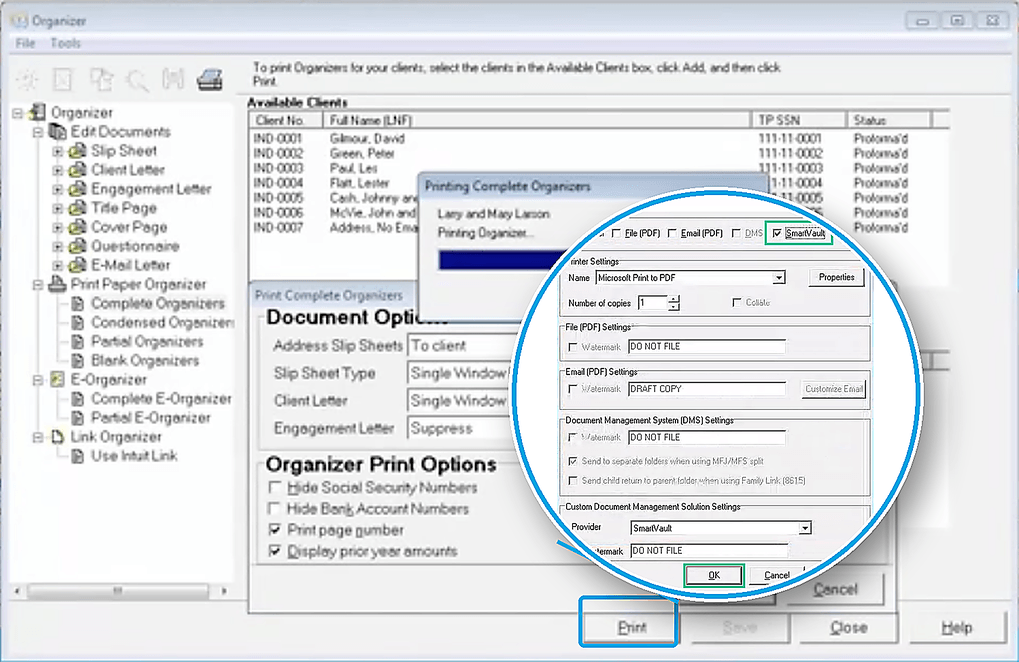
The Only Integrated Tax Automation Platform Built For Lacerte
With SmartVault and Lacerte:
- Every return files to the right client folder automatically
- Move returns between Lacerte and SmartVault in one click, no downloading or renaming
- SmartRequestAI reads prior-year returns to build each client’s request list automatically
- Clients upload through a secure portal, no email attachments to chase
- Documents arrive sorted and labeled, so prep starts organized
From Prior Year Data to a Draft Return in Lacerte
A four-stage view of how prior year data moves from intake to a review-ready draft return. Step through each stage to see how client data becomes organized, prep-ready tax work.
Prior year data pulls in automatically, before anyone touches a file.
SmartRequestAI collects prior year data automatically from Lacerte and builds a personalized questionnaire from it, so clients start from something mostly filled in, not a blank organizer. Reminders handle the follow-up, so no return stalls waiting on one client.

Every client gets their own custom request, built from what they filed last year.
SmartRequestAI turns prior year data into a document request list and questionnaire specific to that client, so nothing gets requested that’s already known and nothing gets missed.

Every answer and document lands in one prep-ready workpaper, automatically.
As clients respond, SmartRequestAI assembles their answers and documents into a bookmarked, prep-ready workpaper inside SmartVault, so nothing waits until intake closes to get organized.

The finished workpaper creates the draft return back in Lacerte.
Once the workpaper is complete, it returns to Lacerte and creates the draft return, ready for the CPA to review. No retyping the workpaper into the return, no manual data entry.

Pricing tailored to your firm's volume.
Stop Chasing Documents
Eliminate the back-and-forth of document collection with AI-powered intake built directly inside SmartVault.
- Prior-year returns generate a personalized document request list
- Automated follow-ups & status tracking
- Documents automatically routed into client folders
- Works inside your existing SmartVault workflow
- Closed-loop, SOC 2 Type 2 compliant — client data never leaves the vault
Available as an add-on to Accounting Pro and Accounting Unlimited annual plans.
SmartRequestAI Bundles
Simple per-return pricing — save more as your volume grows.
$750 per bundle
No long-term contract · Requests never expire
You knew us for document storage. See the workflow it became.
Get priced, signed, and paid before prep starts
SmartProposal (Q1 2027) puts pricing, signature, and payment in one link. Nothing about starting an engagement is manual.
- A clear proposal with tiered options in the portal
- One link for pricing tiers, the signature, and the deposit, not three separate steps
- Builds and sends the proposal from a reusable template in minutes
- Know exactly where every engagement stands, signed, paid, or still waiting, without asking
Prior year data does the chasing for you
SmartRequestAI pulls each client’s prior year data automatically from Lacerte, then builds a personalized document request list and custom questionnaire instead of handing clients a blank request. Automated reminders follow up until they submit, so nothing waits on staff.
- Personalized request, built from prior year data, not a generic organizer
- Branded, mobile-friendly portal, no new login required
- Automated reminders follow up until clients submit
- Every upload files itself into the client’s SmartVault folder automatically
One click data push turns the workpaper into a draft return
SmartRequestAI assembles a prep-ready workpaper automatically as clients respond, no manual sorting or filing. When it’s complete, one click sends it into Lacerte and creates the draft return, so your team’s time goes to technical accuracy, not data entry.
- Prep-ready workpaper assembled automatically as answers and documents come in
- One-click push sends the workpaper straight into Lacerte
- Draft return creates itself, no manual re-entry
- Every return lives in one central workspace, nothing scattered across tools, reducing risk
Payment clears before the return reaches the client
Securely release returns and capture eSignatures while using automated checkpoints to ensure you are paid so nothing gets delivered until the invoice is settled.
- 8879 eSignature built into the delivery flow
- Payment collected before the return releases, when the firm requires it
- Branded portal keeps delivery consistent with the firm, not a generic email attachment
- Automatic notifications tell the client the moment their return is ready
Every return stays retrievable and audit-ready
Search any client, any tax year, in seconds, with a full audit trail showing exactly who touched what, when.
- Global search across every client and every tax year
- Full audit trail with role-based permissions
- Prior year returns pulled up instantly for advisory conversations
- Automated retention rules so nothing gets held longer than it has to be
Switching from Intuit DMS? Our team moves your Lacerte data for you.
Intuit DMS migrations don’t require you to extract files into a Windows folder structure first — we handle it.

Migration Consultation
Meet with a SmartVault specialist to review your Intuit DMS or shared-drive structure, then align on timeline, next steps, and expectations.

Data Upload & Client Matching
Use the Assisted Migration Wizard to upload your data, then run a guided client matching exercise so every Lacerte client’s documents land in the right vault.

Disbursement & Verification
We disburse documents into client vaults and run a clean-up pass to verify your data is organized, accessible, and ready before tax season.
*Intuit DMS and SmartVault-to-SmartVault migrations require no manual extraction into Windows folders.

What changes for your firm in week one.
Folder hierarchies build themselves. Permissions follow the rules you set. Clients only see what they’re supposed to see.
Returns file themselves
“Print” really means routing — a PDF of the return saves straight from Lacerte into the correct client folder. Client, Government, and Preparer copies each land in their own folder.
Your desktop, supercharged
Connected Desktop feels like the file explorer your team already knows. Open in Excel, Word, or Adobe — edits auto-save back with full version history.
Clients send docs unprompted
Clients snap a photo of a W-2, 1099, or receipt on their phone. SmartScan converts it to a clean PDF and delivers it into the right folder in your firm's vault.
No file gets lost
Drop files from anywhere on your desktop into Connected Desktop. No renaming chaos, no scattered tools — just drag, drop, and keep working.
Trusted by Intuit. Proven by ProSeries pros.
In business since 2008. Zero data breaches.
600+M documents stored. Intuit’s #1 recommended document management partner for ProSeries, Lacerte, and ProConnect.

"We are committed to enabling a best-of-breed ecosystem of apps that bring high-value capabilities to our customers. SmartVault has been a leading provider of document management solutions to the accounting industry and Intuit customers for over ten years."

Jorge Olavarrieta
VP and GM of Intuit ProTax Group
Why 30,000 Accounting and Business Professionals Trust SmartVault
SmartVault supports over 3 million users, securely stores over 500 million documents, and has facilitated hundreds of thousands of signatures.
The reason clients actually use your portal.
Your Brand, Your Domain
Clients land in a portal with your firm logo, your colors, and a subdomain linked to your website. It feels like an extension of your practice — because it is.
Two Things, On Purpose
Clients can do exactly two things: upload a document or view their files. A built-in 3-minute tutorial video walks them through it the first time they log in.
SmartScan from Any Phone
Clients snap a photo of a W-2 or 1099 on their phone. SmartScan auto-resizes, converts JPEG to PDF, and drops it straight into the right folder in your vault.
Bank-Grade Login
Password plus two-factor authentication on the very first sign-in. Every upload is timestamped and appears in your Connected Desktop the moment they hit save.
Sleep through busy season. Pass any audit.
Purpose-built to protect Lacerte client data, maintain audit readiness, and keep the firm name on the door — backed by zero data breaches since 2008.
Built to Protect Your Firm and Your Clients
Every workflow — from document collection to client delivery — runs inside SmartVault’s certified, compliance-ready infrastructure.
- Structured folder architecture with enforced naming — so nothing gets misfiled, ever.
- Granular role-based permissions with MFA — so staff only see what they’re cleared to see.
- Version control & full audit trail on every document — so you can roll back any mistake.
- Automated retention & compliance policies — so IRS 4557 and FTC Safeguards handle themselves.
- Activity Log with user + IP, exportable to CSV — so you answer any audit request in minutes, not days.
SOC 2 Type 2
Continuously audited over 6–12 months
ISO 27001 & 22301
Certified data security & business continuity
IRS 4557 & FTC Safeguards
Aligned with IRS data security plans & FTC Safeguards Rule requirements
AES-256 Encryption
Bank-grade encryption protects data at rest and in transit
What is intake time worth to your firm?
Assumes ~75 minutes saved per return and a blended staff rate of $85/hour. These results are estimates. A SmartVault specialist can walk through the exact savings for your firm.
See your Lacerte workflow on SmartVault in 15 minutes.
"*" indicates required fields
SmartVault integrates across the entire Intuit ecosystem.
Intuit ProConnect Tax
Moving to ProConnect? SmartVault is the exclusive integrated document management for ProConnect — returns route straight into secure client folders.

Intuit ProSeries Tax
Considering ProSeries? Bring SmartVault with you — streamlined document management, eSignature, and a branded client portal built for ProSeries firms.

Intuit QuickBooks
Attach documents directly to QuickBooks Online transactions and records. Accounting files stay organized and audit-ready alongside your tax work.

See every way SmartVault works with Intuit
One page covering Lacerte, ProConnect, ProSeries, and QuickBooks — compare integrations and find the right fit.
Have Questions? We've Got Answers.
Common questions about the Lacerte + SmartVault integration, security, and migration.
-
How does SmartVault integrate with Lacerte?
SmartVault installs as a Print Driver inside Lacerte, so you can print finished returns and supporting documents straight into the correct client folder — no exports, downloads, or re-uploads required.
-
Can I migrate from Intuit DMS to SmartVault?
Yes. SmartVault offers Assisted Migration directly from Intuit DMS — no need to extract files into a Windows folder structure first. Our team handles client matching and verification so your Lacerte history moves cleanly.
-
Is SmartVault officially supported by Intuit?
Yes. SmartVault has been Intuit’s exclusive integrated DMS for Lacerte since 2014, and now extends to ProSeries and ProConnect.
-
Is SmartVault secure enough for compliance audits?
Yes. SmartVault is SOC 2 Type 2 compliant, AES-256 encrypted, and aligned with IRS 4557 and FTC Safeguards Rule requirements — including support for WISP documentation.
-
What eSignature options are available?
SmartVault’s eSignature is powered by DocuSign — perfect for IRS Form 8879. Add it on to Accounting Pro, or get unlimited eSignatures and KBAs included with Accounting Unlimited. Already have DocuSign? Connect your existing account.
-
Does SmartVault work alongside Lacerte on Windows?
Yes. SmartVault installs natively on Windows and integrates directly with Lacerte’s desktop workflow.
-
If we move from Lacerte to ProConnect or ProSeries, does SmartVault come with us?
Yes. SmartVault integrates with ProConnect and ProSeries too, and your documents and folder structure stay the same when you switch.
-
What's the difference between SmartVault and a generic client portal?
Generic portals rely on manual print-to-PDF and upload. SmartVault is jointly developed with Intuit, so Lacerte returns route to client folders automatically and prior-year Lacerte data feeds client requests.
Still have questions?
See how SmartVault works inside Lacerte — book a personalized demo and we’ll walk you through the integration, security, and Intuit DMS migration.
Resources for Lacerte Firms
Guides, demos, and insights to help your Lacerte firm get the most out of SmartVault.