











The document management system for your UltraTax CS workflow.

The tools your firm actually needs, all in one place.
SmartRouting with One-Click Filing
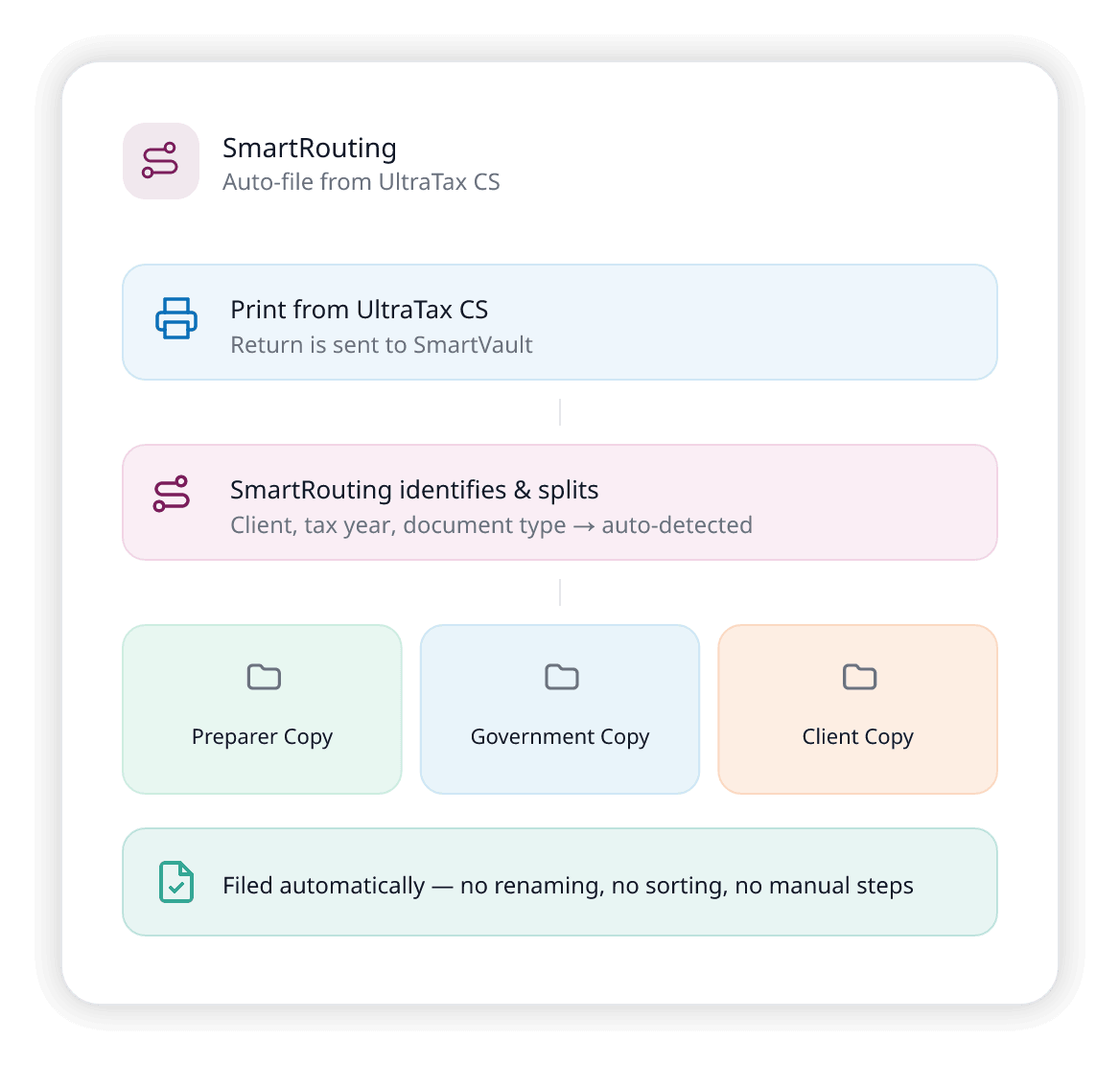
Route UltraTax CS returns directly into organized SmartVault folders — no downloading, dragging, or naming.
Learn MoreLinked Clients
Organize returns and documents by individual or household, without duplicating data — perfect for married couples, dependents, or small businesses.
Learn MoreFlexible Vault Structure & Permissions
Build any folder structure you need — then control who sees what. Internal staff and external clients work in the same system, with documents routed to the right folders and the right access levels automatically.
Learn More
The complete UltraTax CS DMS - Everything your firm needs. Nothing you don't.
Unlimited Cloud Storage
No more 100GB limits. Store everything.
Learn MoreSOC 2 Type 2 Compliant
Enterprise-grade security, built for tax firms.
Learn MoreBranded Client Portal
Clients can upload and retrieve files securely, on desktop or mobile.
Learn MoreUnlimited eSignatures
Handle 8879s and engagement letters without envelope fees or external apps.
Learn MoreUnlimited Guest Users
Scale without per-user restrictions.
24/7 Mobile Access
Your team and clients, any device, anywhere.
100% Uptime
During tax season, no disruptions or crashes during peak deadlines, SmartVault just works.
U.S.-Based Support
Get expert help by phone, chat, email, or video conference, without paying extra.
Let’s Map Your Firm’s Workflow Together.
- 15-minute discovery call, on your calendar
- A live look at the workflow for your firm size
- Straightforward pricing and migration options
"*" indicates required fields
Already on Another Thomson Reuters Tool? We'll Move You Over.
SmartVault does it for a fraction of the cost.

Extract
We'll connect you with our trusted extraction supplier who safely pulls your data from FileCabinet CS, Onvio, or other Thomson Reuters tools.

Import
Documents organized into SmartVault folders with naming and structure intact.

Onboard
Dedicated manager + role-specific training for your team.
*Migration timelines may vary depending on firm size and data complexity.

Replace Multiple Tools With One System.
Today's Tools
- FileCabinet CS Local document storage
- NetClient CS Client portal
- Onvio Firm management
- GoFileRoom Document storage
- SafeSend Tax Automation
Multiple vendors. Higher cost. Disconnected workflows.
SmartVault
- Online document management
- Client portal & collaboration
- Client intake + workflow automation
- Integrated DMS + portal + workflow
- Custom request list + eSignatures
One platform. Lower cost. Simpler tech stack.
Currently a FileCabinet CS Customer?
See the full side-by-side comparison.
Where SmartVault Fits in Your Tax Prep Workflow
- Print from UltraTax → auto-filed by SmartRouting
- Linked Clients connect related entities across your vault
- Structured folders replace drawers with templates and permissions
- One system from engagement through archive — no tool-switching
- Built-in client portal replaces NetClient CS
Keep What Works, Fix What Doesn't.
- Enhance your UltraTax CS investment with modern, integrated solutions
- Transform your practice without disrupting tax prep workflows
- Replace clunky portals & fragmented tools with one system
- Create a more efficient, secure, and profitable firm
The sunset is real. The clock is ticking.
Thomson Reuters is ending FileCabinet CS on December 31, 2027. Support, updates, and integrations will stop. Firms that plan early move on their own terms. Learn More
Avoid last-minute migration chaos
Firms that wait until 2027 face rushed timelines and limited support.
Improve workflows now
Every month on FileCabinet CS is another month of manual work you could automate.
Reduce busy-season risk
Migrating during tax season is a nightmare. Start now and be ready.
Upgrade your client experience
Clients expect a modern portal — not email attachments and NetClient CS.
Security Is Not an Add-On. It Is the Foundation.
Purpose-built to protect sensitive client data, maintain audit readiness, and meet the highest regulatory standards.
Built to Protect Your Firm and Your Clients
Every workflow — from document collection to client delivery — runs inside SmartVault’s certified, compliance-ready infrastructure.
- Structured folder architecture with enforced naming
- Granular role-based permissions with MFA
- Version control & full audit trail on every document
- Automated retention & compliance policies
- Immutable, timestamped activity logs
SOC 2 Type 2
Continuously audited over 6–12 months
ISO 27001 & 22301
Certified data security & business continuity
IRS 4557 & FTC Safeguards
Aligned with IRS data security plans & FTC Safeguards Rule requirements
AES-256 Encryption
Bank-grade encryption protects data at rest and in transit
Have Questions? We've Got Answers.
Common questions about the UltraTax CS + SmartVault integration, security, and migration.
-
Does SmartVault replace UltraTax CS?
No. SmartVault complements UltraTax CS — it replaces the document management, client portal, and eSignature tools bundled around it (FileCabinet CS, Onvio, GoFileRoom, NetClient CS). Your tax prep workflow stays exactly the same.
-
How does the migration from FileCabinet CS work?
There are two steps: extracting your data from your current Thomson Reuters system, and importing it into SmartVault. SmartVault offers professional migration services to handle the import — typically completed in 4–6 weeks depending on data volume and number of clients.
-
How much does migration cost compared to Thomson Reuters?
Thomson Reuters typically charges around $18,000 for migration services. SmartVault’s migration is significantly less — the exact cost depends on your data size and number of clients, but firms consistently save thousands.
-
What is SmartRouting?
SmartRouting reads metadata from UltraTax CS to automatically identify the client, tax year, and document type. Returns are split into Preparer, Government, and Client copies and routed directly into the correct folders.
-
What are Linked Clients?
Linked Clients lets you connect related accounts — personal and business, parent and subsidiary, spouse filings — so your team can navigate between them instantly.
-
How is SmartVault's folder structure different from Thomson Reuters drawers?
Thomson Reuters drawers are internal-only and rigid. SmartVault uses Vaults and Folders that combine internal and client-facing documents in one system with granular permissions and customizable templates.
-
What is the best document management system for UltraTax CS?
SmartVault is purpose-built to work alongside UltraTax CS as its document management layer — handling everything Thomson Reuters’ bundled tools (FileCabinet CS, NetClient CS, GoFileRoom) used to cover, in one system. Returns route automatically into organized client folders through SmartRouting, clients get a branded portal for uploads and e-signatures, and every document is protected with role-based access, audit trails, and SOC 2 Type II security. Firms use it as a full replacement for FileCabinet CS without changing how they prepare returns in UltraTax CS itself.
-
Is SmartVault secure enough for tax firms?
SOC 2 Type 2 compliant. Meets IRS Publication 4557 and FTC Safeguards Rule requirements. Advanced encryption, role-based access controls, and detailed audit logs.
-
What about uptime during tax season?
100% uptime during tax season. No disruptions, no crashes, no excuses.
Still have questions?
See how SmartVault works alongside UltraTax CS — book a personalized demo and we'll walk you through the integration, security, and migration off FileCabinet CS.
Why 30,000 Accounting and Business Professionals Trust SmartVault
SmartVault supports over 3 million users, securely stores over 500 million documents, and has facilitated hundreds of thousands of signatures.
Resources for UltraTax CS Users
Guides, demos, and insights to help your firm get the most out of SmartVault + UltraTax CS.


See How SmartVault Works with UltraTax CS
*ULTRATAX is a trademark of Thomson Reuters (Tax and Accounting) Inc., and any reference to ULTRATAX does not imply the existence of an affiliation with or endorsement by Thomson Reuters (Tax and Accounting) Inc.