














What “Control” Actually Means in an Accounting and Tax Firm
Most firm owners will tell you they’re in control.
Without even looking at their computers, they can tell you exactly where every client file is, the status of projects, and which returns are with preparers, which are in review, and which are waiting on client signatures.
Sometimes that’s true. If a well-designed system is surfacing that information — automatically, consistently, without you having to dig for it — then yes, that’s real control. The system is doing its job.
But that’s not what’s actually happening for most firms.
Most of the time, the owner knows where everything is because they’re involved in every step. They received the client email; they told Sarah where to save the documents. They’re constantly tracking things, building a mental map of their firm’s systems and updating it as projects move forward.
What’s actually keeping things running is constant management — not control.
Real control doesn’t mean you know where everything is because you’re tracking it manually or because you have to be involved in every step. It means the system holds the structure so you don’t have to. Documents end up in the right place without you organizing them. Your team knows what to do next without asking, and work moves forward whether you’re in the office or not.
When your workflow enables real control, you can add clients, bring on new staff, and delegate without everything breaking. Your firm can grow without you having to stretch further to hold it all together.
What Firms Think Control Means (But Doesn’t)
Control is tricky — and not just in accounting firms.
Psychologists have studied this for decades. There’s even a name for it: the illusion of control (first identified by psychologist Ellen Langer in 1975). The research consistently shows that the more personally involved someone is in a process, the more control they believe they have over it, even when that belief isn’t accurate.
Being in charge, staying close to the work, knowing every detail — all of it creates a feeling of control that can be hard to distinguish from the real thing. For firm owners, that feeling is everywhere because they’re everywhere.
Here’s what most firms mistake for control:
Knowing where everything is — manually. You can find any document because you remember where your team saved it or because you’re the one who uploaded it. Not because a system is surfacing that information for you, but because you’re the one keeping track of it all.
Being the go-to person. Your team asks you where files live, which version is final, what the status is on a return. You’re the living index of your firm’s operations.
Solving problems as they come up. A document lands in the wrong place, a handoff gets missed, a client emails asking where to send something. You fix it, move on, and file it under “just part of the job.” These interruptions are your workflow telling you something is broken.
In short, the firm runs because you’re at the center of it — constantly compensating for a workflow that was never designed to run on its own. That kind of “control” doesn’t scale. It keeps the firm dependent on you instead of building something durable.
Here’s the test: if you took a two-week vacation tomorrow, would your firm run smoothly or would things start falling apart by day three? If the answer is “things would fall apart,” you don’t have control. You have a firm that depends on you managing it constantly.
What Control Actually Means
Real control is quieter than most firm owners expect. It doesn’t announce itself — it just means things work the way they’re supposed to, without you having to make them. Firms that have built this share three things.
Calm
Tax season is still hard, of course. But at firms with real control, it’s not chaotic. Deadlines get met without all-nighters. Staff finish their day feeling accomplished. The “where is this?” and “did that get done?” questions that eat up everyone’s time and energy — they mostly just don’t happen.
John Coleman, owner of Commonwealth Business Services, made it to every single one of his kids’ baseball games during tax season. Not because the work slowed down — it’s the opposite, actually. He had more clients than ever. But his firm’s workflow didn’t need him hovering over it to keep moving. That’s what calm looks like in practice.
Predictability
When work moves through a predictable workflow, your team stops guessing. A return ready for review is already in the right place with the right documentation. A client uploads documents and they land exactly where they belong. Nobody opens a client file and wonders what they’re looking at.
Nick Boscia more than doubled his firm from 700 to 1,800 clients — and still takes 10 vacations a year. That’s not a coincidence. His workflow runs through connected integrations that move work automatically from one step to the next, so his team always knows where things stand without him in the room.
Structure
When the system holds the structure, your team doesn’t have to. Folders are consistent because the system builds them that way. Versions are tracked without anyone renaming files. Work moves from one person to the next with the context already in place.
Dawn Brolin didn’t want to build a firm that kept her chained to her desk. So she went fully paperless with SmartVault — and built a practice that could run without her physically present. Now her team handles client questions while she’s away without ever having to track her down. “They can go directly into SmartVault, find exactly what they need, and keep projects moving forward,” she says. “No bottlenecks, no delays.”
Control is structural. It lives in the system — not in your head.
How You Build Real Control
Control doesn’t come from adding more tools, hiring more people, or working longer hours. It comes from designing workflows that don’t require constant intervention. There are three places where that work happens.
Documents route themselves
When every client folder is organized the same way, your team doesn’t waste time reorienting every time they switch files. With SmartVault, client folders build automatically based on templates. Documents print directly to the correct location. Uploads route to the right folders based on smart rules. The structure is there — nobody has to remember to create it.
Handoffs carry their own context
In a controlled workflow, when work moves from one person to another, the context comes with it. The preparer doesn’t have to ask where documents are. The reviewer doesn’t have to reconstruct what happened. The person handling delivery doesn’t have to track down signatures. Commonwealth Business Services scaled from 400 to 670+ returns in three seasons without adding staff — because handoffs didn’t require manual coordination. “The integration with Intuit Lacerte prints completed returns to SmartVault in the right place, every time,” Coleman explains. “It’s so quick and much more efficient than what we used to do.”
Clients don’t need you to access their own information
In a controlled workflow, clients don’t email asking “where do I upload this?” or “how do I find my return?” They log into the same portal they’ve used from the start. Everything lives in one place. “If they need copies of tax returns to buy a home, they can quickly go into SmartVault and find what they need — all without our assistance,” Brolin says. That’s what control creates for clients: independence.
The System That Makes Control Possible
Control requires a foundation. In an accounting firm, that foundation is document management — not file storage, not disconnected portals, not scattered cloud folders, but a true system of record designed for how tax work actually moves.
When documents scatter across email, shared drives, and disconnected tools, you’re forced to manage the gaps manually. You become the router, the version tracker, the person who knows where everything lives.
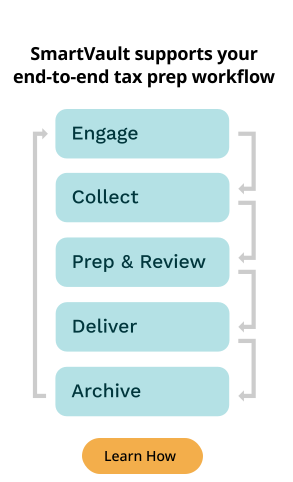
SmartVault changes that by becoming the system of record — the single place where engagement letters, source documents, workpapers, signed returns, and archived files all live, organized by client and year. Documents print directly from your tax software into the right folders. Clients upload into structured environments, not generic inboxes. Versions track automatically. Access is controlled by role, not by whoever happens to have the file.
The workflow holds because the system carries the structure — not because you do.
Want to see what real control feels like? Learn how SmartVault creates connected tax workflows that work without constant intervention — and read our guide on how leading firms are rebuilding their systems from the ground up.