








The Myth of the Modern Accounting Tech Stack (and Why More Isn’t Better)
You thought your new intake platform and e-signature app would make things smoother — less stress, less chaos. Instead, you’re stuck managing multiple platforms on top of client communication, tax prep, and filing.
Why? Because the tech industry has convinced you that modernization is simply a shopping list. More tools. More subscriptions. But they’re conveniently leaving out the hard truth: Every disconnected tool you add makes things worse.
Modernization isn’t about more tools — it’s about connecting the tools you already have. We’re breaking down the myth of modernization, why you don’t need more apps, and what the real problem is.
When Accumulation Doesn’t Mean Acceleration
We’ve all heard it at one point or another: Less is more. But when your team’s burnt out after a busy tax season, more seems like it might be better. More headcount to manage the workload. More tools to streamline everything from client communications to compliant storage.
But before you start adding single-point solutions or tools for one-off problems, ask yourself, “Will this really accelerate our work?” Because the reality is…
More often than not, adding more tools slows you down and adds bloat.
Tech bloat is like cooking dinner in a kitchen where every tool’s stored in a different room. The knife’s upstairs, the cutting board’s in the garage, and the frying pan is in the dining room. Nothing’s wrong with any individual tool, but the constant back and forth slows everything down and increases the risk that something will get missed.
Here’s how your tech stack goes from helpful to bloated:
- A new problem arises. You get a tool to fix it — on top of the 8-12 different software tools you’re already juggling during tax season. (Yes, really. The average firm uses that many.)
- You repeat this process over and over until your tech stack becomes a hindrance, forcing you to switch between apps, maintain logins, and manage a growing number of disconnected tools.
- As you add more tools, you feel like you’re modernizing, so you keep accumulating software. The result? Tech bloat that creates more problems than it solves.
You’re unintentionally mistaking accumulation for acceleration. And that’s why tax season still feels stressful and chaotic — because of all the tools you add.
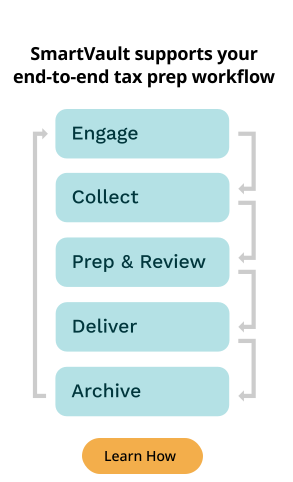
Not sure if you’ve got a tools or workflow problem? Ask your team to walk you through your tax prep workflow — engagement to archive. Can they describe it in 30 seconds without mentioning multiple logins and app switching?
If not, you don’t have a workflow. You’ve got a workaround that’s costing you big time.
3 Hidden Costs of Faux Modernization
Accumulation ≠ modernization. Instead of driving efficiency and a better client experience, the tools are creating a sense of faux modernization that’s costing you more than just the subscription and licensing fees.
The real cost? It shows up in places you typically don’t notice until it’s too late. Here are the three most common hidden costs of adding more, more, more.
Security Risks Times a Dozen
You had good intentions — better encryption, faster uploads, more secure signatures. New tools to drive modernization and solve new problems.
But what you didn’t realize is that more vendors means more third parties holding your clients’ most sensitive data (Social Security numbers, W-2s, tax returns). And that opens you to more compliance and security risks.
Every new platform in your tech stack is a new vulnerability. 12 tools, 12x the risk. Not only do you open yourself up to data breaches and fines, but you also jeopardize compliance with the Federal Trade Commission’s (FTC) Safeguards Rule
The Safeguards Rule requires financial institutions under FTC jurisdiction to have measures in place to keep customer information secure. In addition to developing their own safeguards, companies covered by the Rule are responsible for taking steps to ensure that their affiliates and service providers safeguard customer information in their care.
It requires tax professionals to create and maintain a Written Information Security Plan (WISP) — it must cover every service provider you use, not just the tax prep software.
That means you’re legally required to:
- Vet every vendor’s security capabilities
- Confirm your vendors maintain appropriate safeguards
- Assess their safeguards regularly
Now multiply that by 8-12 different tools. That’s a dozen vendors you need to monitor for compliance — everything from proper encryption and access controls to audit trails. Get it wrong, and your WISP falls apart, leaving you with non-compliance penalties, lawsuits, and data breaches.
According to IBM’s Cost of a Data Breach 2024 report, the average cost of a data breach reached $4.88 million.
But the biggest cost? Long-term reputational damage. When clients trust you with sensitive data, one breach is all it takes for that trust (and business) to vanish.
So before you add another platform in the name of modernization, ask yourself, “How many vendors have access to my clients’ data? And are they all WISP-compliant?” If you don’t know the answer, you’ve got a liability problem.
Unnecessary Client Friction
Consumers are spoiled for choice. So when you make them upload their tax documents through one platform, download another app to review their return, and create an account somewhere else to sign Form 8879, they just might take their business somewhere else.
The brutal truth is that clients don’t care about your backend systems. They want to file their taxes — no signing up for multiple platforms, juggling multiple logins, or complicated processes.
When you send multiple links vs. directing them to one secure portal, you’re not showing them you’re modern… you’re telling them you haven’t figured it out yet. This fragmentation leads to friction, which leads to frustration. And frustrated clients don’t stick around.
Your clients expect integrated experiences, which you can only deliver by connecting your tech stack, making the process feel seamless, no matter how many apps or platforms you have.
Because in the end, your clients don’t care about your tools. They just want an already annoying experience (filing taxes) to be quick and painless.
Staff Inefficiency and Burnout
A Harvard Business Review study found that employees switch between apps a whopping 1,200 times per day, losing nearly four hours per week just to context-switching. Four hours that could’ve been spent on billable work or getting home before 8:00 pm.
But the switching isn’t even the biggest problem. It’s the invisible work your staff’s doing to manage the gaps between your disconnected tools, like:
- Sorting documents that didn’t auto-file
- Tracking down signatures across three platforms
- Chasing version history because nobody knows which PDF is final
- Answering “Where do I upload this?” for the fourth time
They’re managing the fragmentation that quickly burns out even the most dedicated professionals. It’s exhausting. And it’s not billable or tax prep work. It’s lost efficiency masquerading as modernity.
Sure, you can hire more staff. But if you still have a fragmented workflow, you’re just throwing more bodies at a broken system. The real solution? A connected backbone that brings everything together, eliminating friction and creating processes that just flow.
What a Modern Accounting Tech Stack Actually Means
We’ve said it once, we’ll say it again:
Modernization is about connection — not accumulation.
Instead of thinking about what tools you need for intake, signatures, or storage, modern accounting firms consider how to flow their entire tax prep workflow — from engagement through archive — through a connected system.
The difference? Accumulation stacks tools. Integration connects tools, workflows, and people.
A truly modern accounting workflow is built around integration and typically looks like this:
- Documents route themselves to the right place without manual sorting or guessing which folder a file should go in.
- Teams pick up where others left off without wasting time trying to gather context.
- Clients have a single portal — no juggling different links, just one place to upload, review, sign, and pay.
- Compliance is the priority, which means security, audit trails, and retention policies all happen automatically in the background.
And before you jump in with, “AI can fix this!” let us remind you that all AI does is automate chaos faster. If everything’s still a mess, AI will only amplify that mess. Think connection first, automation next.
The good news? You don’t need to rip out your tech stack or start from zero. You just need to build a backbone that connects what you already have, so everything works together rather than against each other.
Because modern means seamless, not more.
Stop Adding More Tools. Start Connecting.
We get it: It’s easier to believe that the next tool will fix everything. Just one more platform or integration, and tax season will finally feel manageable. But that’s simply not reality.
The relaxed, thriving teams aren’t those with the longest app lists — they’re the ones who connected their workflow end-to-end.
So, is your tech stack actually modern?
If you’re still chasing files across platforms, your clients are confused by your process, and your team’s burnt out despite all the tools you’ve added… then the answer’s no. You don’t have a modern tech stack. You’ve got a fragmented system.
But it doesn’t have to stay that way. Check out our Tax Prep Workflow 2.0 guide to see how you can turn fragmentation into flow and build a truly connected tax prep workflow.