







Table of Contents
- Preface: It Doesn't Have to Be This Hard
- Introduction: Why Workflows Break (and How to Fix Them)
- Chapter 1: Engage — Building the Foundation for Everything That Follows
- Chapter 2: Collect — From Scattered Documents to Systematic Intake
- Chapter 3: Prep & Review — Eliminating the Search-and-Sort Bottleneck
- Chapter 4: Deliver — From Manual Chase to Instant Professional Service
- Chapter 5: Archive — From Compliance Scramble to Automatic Protection
- Conclusion: Your Connected Workflow
Preface: It Doesn't Have to Be This Hard
If you ask most accountants what tax season feels like, you’ll hear the same answers: stressful, overwhelming, exhausting. Long nights, overworked staff, and clients who don’t send what you need until April. Research shows 99% of accountants report some level of burnout, with almost 70% saying it’s chronic.
Accounting Today strategist Drew Carrick captured the severity of this crisis after a rare New York earthquake hit during peak busy season. An accountant at a Big Four firm texted him: “I thought this was the end. I was like, finally, no more deadlines.”
“This kind of thinking…isn’t even that uncommon in our industry,” Carrick said. “We’ve all had those moments where we’re so burnt out and exhausted that we start fantasizing about some kind of escape, no matter how drastic … It’s not just a little stress or a bad day at work. This pervasive, all-consuming feeling of dread and hopelessness just eats away at you, day after day, until you start thinking about some pretty messed up things.”
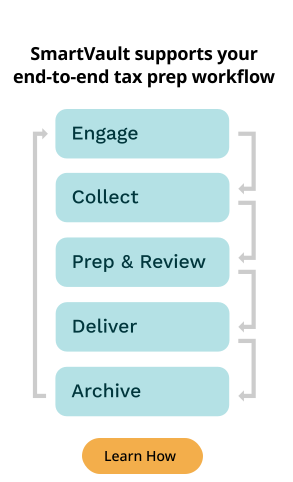
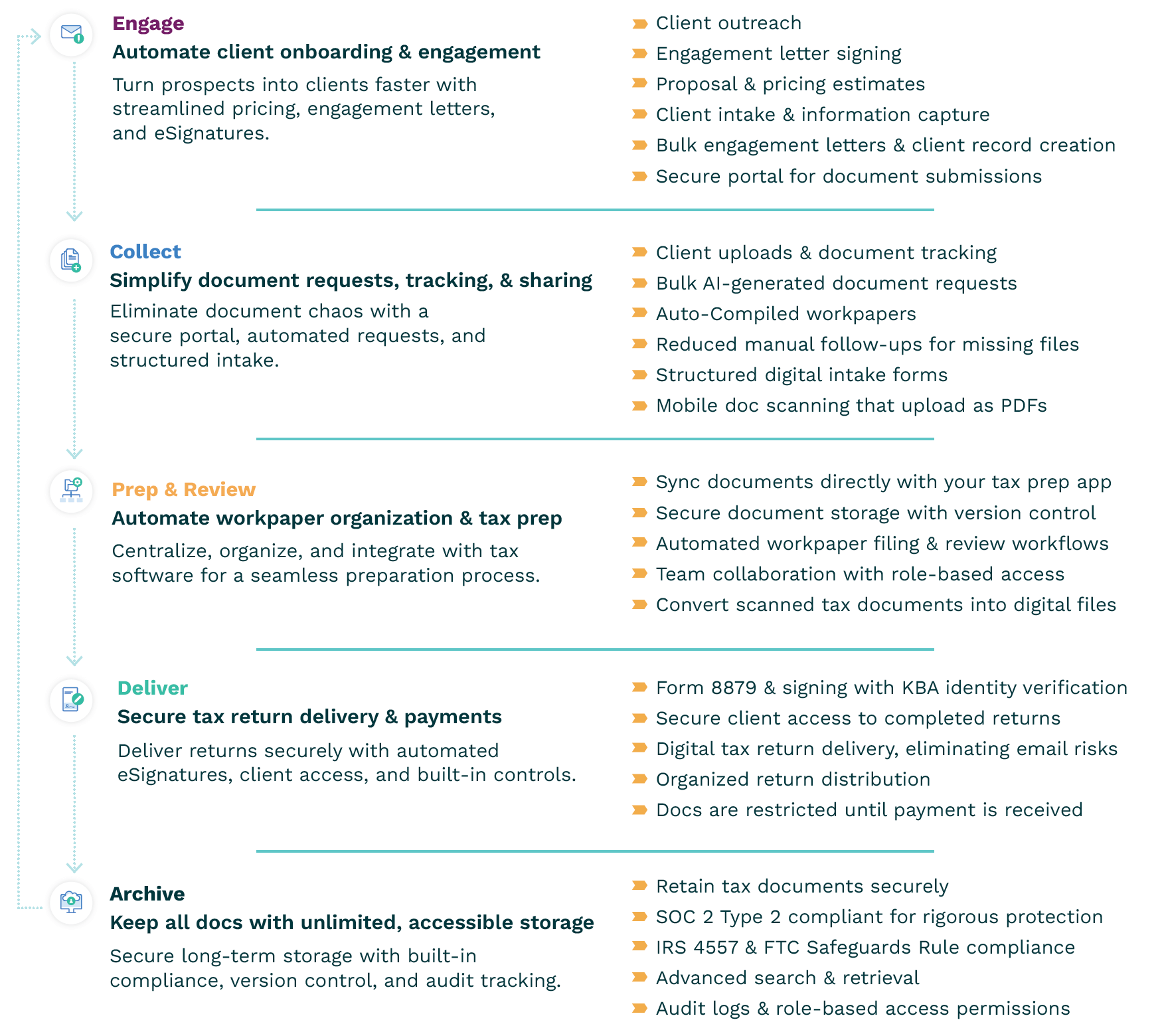
Most people default to blaming the work itself. But let me prove to you it’s not the work… It’s the workflow. Every tax return moves through five predictable stages:
Most firms treat these as separate processes, using different tools, different logins, different handoffs. Each stage then creates friction for the next.
The firms that have broken free have discovered the power of connection. They use platforms like SmartVault that connect everything into one seamless workflow — with powerful features like direct tax prep software integration, SmartRequestAI™ for automated intake, and a secure client portal that works the way your clients expect.
This efficient, connected workflow is what gives firms freedom. And that’s not just marketing speak. It’s what we consistently hear from firms proving burnout isn’t inevitable.
This guide will walk you through the five stages in order. At the end of each chapter, you’ll see a short “Next Up” handoff showing how doing this stage well sets up the next one. Follow the chain, and you’ll build momentum across your entire process.
About the Author: Get to Know SmartVault
SmartVault provides a secure, cloud-based document management and client portal platform purpose-built for accounting and tax professionals. Trusted by over 3 million global users, SmartVault is SOC 2 Type 2 compliant, offering security features that help firms meet IRS 4557, FTC Safeguards Rule, and GLBA compliance requirements.
SmartVault goes beyond document storage to automate the full tax prep workflow, integrating seamlessly with tax prep software, including Lacerte, ProSeries, ProConnect Tax, UltraTax CS, Drake, and CCH. SmartVault firms save up to 60–90 minutes per return.
Introduction: Why Workflows Break (and How to Fix Them)
The profession has a workflow problem that goes way deeper than busy season stress.
One CPA on Reddit r/taxpros captured the breaking point: “I’m burned the (bleep) out. I am making changes before next season. I may just…do a complete pivot or close entirely. I don’t know. But I do know that these returns sitting on my desk aren’t getting done this week.”
Another noted a damaging cascade effect: “What was happening was I had an important thing to finish one day, but I would get a phone call, a request, a quick meeting and before I knew it the important thing was due… Weeks later, client gets a call from some entity that something is off and I realize that I made a mistake because I rushed the work.”
These aren’t outliers. They’re your colleagues venting what you have probably felt but maybe haven’t said out loud. Now, this isn’t individual failure. It’s typically system failure from running five disconnected processes instead of one integrated workflow.
The Hidden Cost of Disconnected Systems
The average accounting firm uses 8-12 different software tools during tax season. Think about how absurd that is. Studies show the average employee switches between apps 1,200 times per day, losing nearly 4 hours a week just getting back on track. In accounting specifically, 97% of firms believe they’re not using technology efficiently.
This is death by a thousand logins. Tool sprawl creates three critical problems:
- Security risk: every extra app is another vendor with client data.
- Reputational risk: clients question your professionalism when you send three links for one return.
- Productivity drain: staff easily lose hours per week just switching apps.
The Firms That Broke Free
Nick Boscia’s firm more than doubled its client base from approximately 700 to 1,800 clients without adding stress, overtime, or burnout. Jennifer Magyar at Cornerstone CPA went from frustrated clients to seamless operations. Commonwealth Business Services increased return volume by 10% without adding staff.
Visit one of these firms during peak season, and you’ll notice something different. Staff aren’t exhausted. Partners can take time off without worrying about everything falling apart. Clients refer their friends instead of complaining about the process.
Are these unicorn firms with secret fairy dust in their toolbelts? Not at all.
They’re regular practices just like yours that made one critical shift: they stopped patching their workflow with disconnected tools and instead built it around one integrated platform. This created a systematic approach where each workflow stage makes the next stage easier.
That’s exactly what we’ll show you how to build, starting with where every tax return begins: client engagement.
Chapter 1: Engage — Building the Foundation for Everything That Follows
The moment a prospect chooses your firm, you have about 72 hours to prove you’re modern and easy to work with. They’re comparing you to their bank, their insurance company, every service provider that lets them handle business from their phone. When you send them three different links and a PDF with instructions, you’re signaling your firm hasn’t adapted to how business gets done today.
The Client Expectation Gap
Higher-value clients expect sophisticated technology experiences (seamless digital workflows and greater efficiency). They expect you to have your act together. When you don’t, they start questioning whether your firm is really the right choice, which kills your chances of expanding into advisory work or earning referrals.
But all too often, engagement becomes an obstacle course: one system for proposals, another for signatures, a third for document uploads, with novel-length email instructions tying it all together. Clients ask, “Which link do I use first?” Staff waste time answering.
It wasn’t too surprising that, on a recent webinar with Dawn Brolin, CFE, CPA, 46% of attendees admitted they don’t have a formal engagement and onboarding process. This means they’re reinventing the wheel with every new client, creating delays and frustration that mess up everything that comes after.
When engagement is clunky, everything that follows gets harder.
Clients default to email attachments, phone calls, and random text messages because the process feels confusing. Documents start arriving in scattered PDFs and untracked emails, creating instant disorganization. Staff waste hours fielding “Where’s my return?” calls instead of moving work forward. Misfiled documents pile up from day one, slowing prep and review before they even begin. What starts as a messy onboarding quickly becomes a chaotic tax season.
How Leading Firms Connect Engagement to Success
The answer isn’t adding more tools. It’s connecting everything in one place. Here’s how leading firms handle engagement:
Quick Prospect Qualification
Modern firms use brief qualification forms that capture what they need for accurate proposals: previous year complexity, service needs, basic contact information. This lets them respond quickly while the prospect is still motivated.
Professional First Impressions
Instead of waiting days to send proposals, smart firms respond within hours using standardized, branded templates that look professional right from the start. They’ve standardized their language and pricing, so engagement letters generate instantly. Clients get secure portal access, so they can review and sign directly in the portal.
Make sure your system automatically routes documents into folders pre-built by tax year and client type, and easily lets admins assign staff and set granular permissions for access.
Modern Experience
Clients have secure portal credentials that work exactly like they expect — accessible from any device, professional interface, simple navigation.
They can review and sign the engagement letter right in the portal, then immediately know exactly where “home base” is for all future interactions. No more wondering “Where do I send this?” or “Which system should I use?” Most importantly, they can review documents, sign agreements, and upload files from anywhere, anytime — which is what nearly every other professional service provider lets them do.
Liberty Tax Services: Success Story
Liberty Tax Services saved over $5,000 annually while dramatically improving their client experience. But franchisee Carolle Ryan’s firm first had to escape a patchwork of Microsoft-based tools that weren’t built for tax practices.
The cumbersome processes and lack of tax-specific features made it difficult for Carolle’s team to stay organized and responsive to their 1,000+ clients. Worse, clients had to navigate multiple disconnected systems.
After consolidating everything into SmartVault, the firm can quickly create custom forms and proposals. Clients can easily review, complete, and eSign documents from anywhere, all securely online.
“SmartVault has become a one-stop place for storage, portals, encrypted email, auto-filing, electronic signatures, and proposals,” Carolle said. The result? Clients embrace the portal and provide positive feedback on the modern experience, while Carolle’s team can focus on serving clients.
Setting Collection Up for Success
When engagement is connected to your main system, everything is already set up before your client uploads their first document. Portal access established, folders organized, routing rules configured, security permissions in place.
This means your collection stage starts out organized instead of starting from scratch every time, which is exactly what we’ll explore in the next chapter.
Green & Sklarz LLC: Success Story
Eric Green discovered SmartVault during a client disaster — a fire suppression system had destroyed all their physical tax records, turning filing cabinets full of documents into “paper-mâché.” While helping the client rebuild their files, Eric realized his own firm faced the same vulnerability.
But when Eric implemented SmartVault, he discovered something unexpected: the productivity gains were staggering.
Before SmartVault, Eric’s firm spent 3-4 hours on each new client — sending agreements, collecting documents, uploading PDFs, and sorting files. At $150/hour of staff billing time, they were spending $450-$600 per file on unbillable work. “No client wants to see a charge for $600 to “get documents from the client,”‘ Eric explained.
SmartVault changed everything. Instead of staff manually processing documents, clients uploaded files directly into organized folders through the secure portal. “We cut nearly two hours off the set-up and review process,” Eric said.
The math was simple but powerful: $300 of billable time saved per file, multiplied by ten new files per week, equals approximately $150,000 in annual savings – time that could be redirected to revenue-generating client work.
“We accomplish this because we’ve streamlined workflows and made the onboarding process more efficient,” Eric said. “Regardless of which staff person onboards a new client, the process remains consistent: Each client receives the same folder structure and uploads their files accordingly, saving us hours of time.”
Eric’s conclusion? “If you are not using SmartVault in your practice and with your clients, you are gambling with their money, your money, and your very practice.”
Chapter 2: Collect — From Scattered Documents to Systematic Intake
Nearly every firm wrestles with the same collection nightmare. Clients send unusable phone photos. Documents arrive via email, portal, text, Slack, sometimes even fax. Staff spend hours chasing missing items, clarifying unclear uploads, and sorting documents into the right folders…all while the to-do list grows and deadlines approach.
“I cannot keep up with my workflow,” another CPA on Reddit shared. “I don’t know if it’s volume or if it’s the actual work itself. Because I can’t keep up, I find myself making mistakes… I do 99% of things very well, but when I make mistakes like these the stress compounds.”
Here’s the math that should make every practice owner wince: the average firm loses 60-90 minutes per return just collecting documents.
Before anyone even opens tax software, you’ve burned through billable time on creating requests, chasing missing items, sorting uploads, and organizing files — and that’s assuming everything goes smoothly.
As we saw in the previous chapter, tax attorney Eric Green saves $150,000 a year by simply streamlining engagement and onboarding. Here’s how you can save time and money, too.
The Feature That Changes Everything
SmartVault developed SmartRequestAI™ to solve this. Unlike most collection tools that make you rebuild requests annually or expose client data to third parties, SmartRequestAI uses private AI to analyze prior-year returns and automatically generate personalized checklists for each client.
Clients get step-by-step guidance through mobile-friendly questionnaires that only ask for what they actually need to provide. SmartScan technology turns mobile photos into clean PDFs automatically. And when clients upload documents, they flow directly into organized, review-ready workpapers — no manual sorting required. Firms can reduce collection time from 90 minutes to nearly zero per return.
How SmartRequestAI Works: The Modern Client Intake Workflow
Designed for accounting firms, it’s built right inside SmartVault’s secure platform. Instead of manually creating request lists, chasing clients, and sorting files, SmartRequestAI automates the entire document collection process — from request to review-ready workpaper — all while keeping data private and compliant. Built on private AI that never trains on your data, SmartRequestAI keeps everything secure inside SmartVault’s SOC 2 Type 2 environment. Here’s the connected workflow:
- AI Analysis: SmartRequestAI securely scans each client’s prior-year return and identifies the questions & documents needed for the current year—no more generic checklists or guesswork.
- Personalized Request: It automatically builds a customized questionnaire and document request list for each client. Clients receive a clear, guided experience through your firm’s SmartVault portal.
- Mobile Upload + SmartScan: Clients upload documents directly from any device. SmartScan instantly uploads mobile photos into clean, professional PDFs, so you never have to chase blurry images or rescan files.
- SmartRouting + Workpapers: Uploads automatically route into the correct client folders by tax year and compile into organized, review-ready workpapers — no manual filing, sorting, or renaming.
- Real-Time Tracking: A central dashboard shows what’s submitted and what’s still missing, letting your team follow progress, send reminders, and stay in sync with zero spreadsheet tracking.
The Result: A faster, simpler, more secure intake process that saves 60–90 minutes per return, delights clients, and sets every tax return up for success.
The Collection Methods That Actually Work
The firms that have solved document collection share three key strategies, all enabled by having their workflow connected in one platform:
Personalized Request Lists
Instead of sending every client the same overwhelming organizer that makes them guess what applies to them, leading firms generate checklists based on what actually showed up on prior-year returns. SmartRequestAI makes this automatic — the AI analyzes last year’s return, creates this year’s personalized request, and staff can add specific questions as needed. Clients get exactly what they need to provide, nothing more, nothing less.
Mobile-First Upload Experience
Your clients handle paperwork at coffee shops and kitchen tables, not at scanners. When systems turn mobile photos into clean PDFs automatically, clients submit documents whenever it’s convenient.
Real-Time Progress Tracking
Without visibility into what’s submitted versus what’s missing, staff get stuck in endless follow-up cycles. Smart firms use dashboards that show exactly what has been received and what hasn’t, with built-in reminder systems that eliminate the manual chase. You can see which clients have completed their requests, which are partially done, and which haven’t started yet – all in one view. When clients need a nudge, you can send reminders with a click instead of crafting individual emails or making phone calls. And when clients call asking you where things are? You don’t have to check-in with a coworker, you can give them a progress update in seconds.
Boscia & Boscia: Success Story
Nick Boscia’s firm more than doubled its client base from approximately 700 to 1,800 clients, and he now takes 10 vacations a year while the firm runs smoothly. But it wasn’t always this way.
His family firm was trapped in collection nightmare. “Clients were either dropping off physical paper and then we’d have to scan it – and obviously that’s super inefficient – or they’d send us documents in an unsecured email,” he said. These manual processes made it nearly impossible to manage client information effectively and were pushing Nick toward burnout as he was “working a million hours and spearheading every process.”
Nick had a clear vision: a balanced firm that could operate without him so he could explore the world. “If I have to be in my firm every day working for it to operate, I’d never be able to go on vacation and do the things that I love outside of work.”
The breakthrough came when Nick implemented SmartVault in 2019. Clients now upload documents directly into the portal where they’re automatically organized, and the Intuit Lacerte integration routes returns to the right place by client and tax year.
The result? “We doubled our client base because of SmartVault,” Nick said. But more importantly for Nick’s vision, the transformation was so complete that he now takes 10 vacations a year while his firm runs smoothly. His advice to other firms: “If you’re not living your dream life, there are tools out there to make your firm better and give you the life you want.”
Setting Up Preparation for Success
Collection means making life easier for everyone involved. Done right, it gives clients the smooth, modern experience they expect while setting your prep team up to actually succeed.
Documents automatically route to standardized folder structures. Workpapers start building themselves from uploaded files. Version control happens from day one. Integration with tax software means documents land exactly where preparers expect to find them.
Automated collection kicks off your preparation stage with organized, review-ready workpapers instead of scattered files, which changes how prep and review actually work.
Chapter 3: Prep & Review — Eliminating the Search-and-Sort Bottleneck
“I feel like I get stuck on almost everything and should be getting my jobs done, but don’t,” another CPA vented on Reddit. “My mental health has been so spotty… I feel like I’m doing a poor job at work. I can’t focus, get anxious over minor inconveniences.”
This isn’t the sign of a weak CPA, just a weak system. Misfiled documents. Duplicate versions. Partners become the bottleneck because only they know where documents are stored. Team members can’t cover for each other when someone’s out sick.
Preparation should be straightforward: take organized workpapers from collection and complete the return. But when documents are scattered, preparers waste time searching instead of preparing, all while clients wait and deadlines approach.
Then review becomes a nightmare. Partners can’t find what they need, and clients get frustrated with slow, outdated processes.
The Preparation Foundation That Works
The solution to the preparation dilemma starts with something that sounds simple but changes everything: documents that route themselves to exactly where they belong.
Automatic Document Organization
Smart firms use automation that routes documents directly into folders based on file type, tax year, and client. W-2s, 1099s, and K-1s land exactly where they belong, so prep teams get organized files consistent per client type. When someone calls in sick, someone else picks up right where they left off.
Consistent Workpaper Creation
When each preparer builds workpapers differently, reviews take longer and errors slip through. The best systems automatically create structured workpapers from client questionnaires and uploads, giving every preparer the same consistent format to work with across all clients.
Built-in Version Control and Team Collaboration
Good systems track document versions automatically and maintain audit trails so reviewers always know they’re working with the correct, most recent file. Team members can collaborate securely while maintaining proper permissions. No more “final_v2_FINAL_revised.pdf” confusion or wondering who can access what.
Seamless Review Process
Good systems eliminate review bottlenecks by giving the right people access to the right files. You can set granular permissions so partners can review from anywhere, approved team members can access what they need to cover for each other, and clients can view their own documents without calling the office — all while maintaining proper security controls. This frees up staff for higher-value work while keeping sensitive information protected.
Direct Tax Software Integration
When your document management system connects directly to your tax software, completed returns automatically print to the right client folders, client folders and security permissions are created automatically, and clients can review and sign everything in one place. SmartVault integrates directly with Lacerte, ProSeries, ProConnect, UltraTax CS, and Drake, eliminating duplicate data entry and ensuring everyone’s working from the same information.
Setting Up Delivery for Success
When preparation runs this smoothly, teams can work more efficiently. You go from chasing documents to doing the actual work. You aren’t burned out from having to follow up with coworkers about where a signed form is — you can access it yourself. Clients are happy to see their returns moving quickly through the process.
When your tax prep software prints returns directly to your client portal, you can further accelerate the delivery process. We’ll explore this in the next chapter.
Commonwealth Business Services: Success Story
Commonwealth Business Services scaled from 400 to 670+ returns in three seasons without adding staff, and owner John Coleman made it to every single one of his kids’ baseball games during busy season. But first, John had to escape the manual document management drowning his Virginia firm.
His team had to manually upload documents and manage version control by hand. “It was inefficient,” he said, and it was limiting their ability to grow.
The transformation came when John implemented SmartVault. The Intuit Lacerte integration meant completed returns automatically printed to SmartVault to the right place, every time. “It’s so quick and much more efficient than what we used to do,” John said.
The result? Commonwealth scaled from approximately 400 to 670+ returns within three seasons with the same headcount. But the real victory was personal: John was afraid he was going to miss his children’s baseball games due to his profession. “That never happened during this tax season. I was front and center not only for each game, but every practice.”
“SmartVault really has allowed us to keep adding tax clients without having negative impacts on our ability to serve them efficiently,” Coleman said.
Chapter 4: Deliver — From Manual Chase to Instant Professional Service
After weeks of preparation, returns stall waiting for signatures. Form 8879 sits unsigned. Payments lag. Email attachments get lost in spam folders. It’s chase after chase.
You’re calling clients who haven’t responded, and they always say: ‘Well, it’s not in my inbox so…’ So you resend. Meanwhile, you’re waiting on payments while deadlines approach, and staff spend valuable time hunting signatures instead of preparing returns—the work that actually drives revenue.
This kills cash flow, makes clients question your professionalism, and burns out staff who feel like they’re spinning their wheels.
Smart firms figured out: secure portal delivery with automated processes solves the delivery problem while protecting cash flow and maintaining compliance.
The Delivery Approach That Works
Leading firms reject email attachments and manual follow-up, preferring automated, secure delivery systems:
Secure Portal Delivery
Professional firms deliver returns through secure portals where clients access documents 24/7 from any device—the same digital convenience they get from their bank. This positions the firm as security-conscious while giving clients freedom to access their info anywhere, anytime.
Integrated eSignatures with Verification
The best systems include eSignatures with knowledge-based authentication (KBA) to meet IRS requirements for Form 8879. Clients can sign documents anywhere, anytime from their phone or tablet.
No more waiting for office hours, printing and scanning, or delays because someone’s traveling. Signed forms save automatically in the correct client folder, you’re notified, and there are full audit trails.
Dashboard Visibility for Follow-Up
Efficient systems provide dashboard views of what’s pending. Staff quickly see which clients need reminders and send them directly from the system, ensuring nothing falls through cracks.
Payment-Gated Delivery
Leading firms link delivery to payment completion. Returns remain secure until invoices are paid, protecting cash flow. Clients see the completed return alongside the invoice, creating natural motivation to pay from the same portal.
Christa Skoupy, CPA: Success Story
Auxilia Accounting has grown 17% annually over the past three years thanks to streamlined operations. Christa Skoupy credits this dramatic improvement to one key change: eliminating the email attachment chaos that was killing her efficiency.
“Sometimes we had to email a client numerous times because they would lose the email or forget to download a document. It really became time-consuming,” she said.
Everything changed when she moved to SmartVault. The integrated eSignatures were a particular game-changer for delivery. “It will save me the three extra steps it takes me to get a signed document into the system. Over the course of a year, this will add up to big time savings. I’m always looking for ways to further streamline processes,” she explained.
The results were dramatic: “I can honestly say that we’ve seen this growth because our operations are very streamlined. We see great gains in efficiency internally, but I’m most pleased with the time-savings in client communications,” Skoupy said.
Setting Up Archive and Compliance for Success
Here’s the beautiful thing about connected delivery: it automatically sets you up for the next stage without extra work. But it’s not just the delivery documents — it’s everything from your entire workflow.
All those source documents from collection, organized workpapers from preparation, internal notes from review, signed forms from delivery — they’re all sitting in one place, properly organized and ready for compliant long-term retention.
This means your archive stage isn’t a scramble to hunt through different systems or wonder if you have everything you need.
Instead, you’ve got what Dawn Brolin calls your “Single Source of Truth” — every document where it should be, accessible to your team, and ready for whatever comes next.
Which brings us to that final workflow stage that every firm needs by law and loves having during audits: compliant archiving.
Chapter 5: Archive — From Compliance Scramble to Automatic Protection
Archiving is the stage everyone forgets until an auditor calls requesting prior-year returns, a client needs loan documentation, or the IRS asks for supporting documents. Suddenly, simple storage becomes business-critical.
The Compliance Requirements You Can’t Ignore
Archiving isn’t optional — IRS Publication 4557 and the FTC Safeguards Rule require strong safeguards for client data. Every tax professional must comply or face fines and reputational damage.
IRS Publication 4557 Requirements: Requires firms to safeguard taxpayer data with risk assessments, access controls, encryption, and secure backups.
FTC Safeguards Rule Mandates: Requires a Written Information Security Plan (WISP) with risk assessments and vulnerability reviews, encryption at rest and in transit, multifactor authentication, training and monitoring, incident response plans, and more.
The Archive Strategy That Protects and Performs
Leading firms adopt comprehensive archive strategies that support compliance, efficiency, and client service:
Centralized, Secure Storage
Professional firms standardize archives in single platforms with consistent folder templates and automated backup. When a client calls asking for their 2019 return, you know exactly where to find it—and so does anyone on your team. Better yet, with an integrated client portal, clients can access returns themselves.
Advanced, Consistent Organization
Powerful systems auto-route documents to the right place from the moment they arrive, creating consistency across your entire firm. You’ll know exactly where to look for each client (and so will your team and clients).
Automatic Audit Trails
Comprehensive systems track who accessed what document and when, with records that can’t be edited or deleted. When regulators come knocking, you hand them detailed logs instead of scrambling to reconstruct history. Your team gets better internal controls without extra work.
Built-in Compliance Management
Compliance shouldn’t feel like an extra project. Look for a vendor that provides WISP templates, automatic backups, risk monitoring, MFA enforcement, and security reporting.
SOC 2 Type 2 Certification
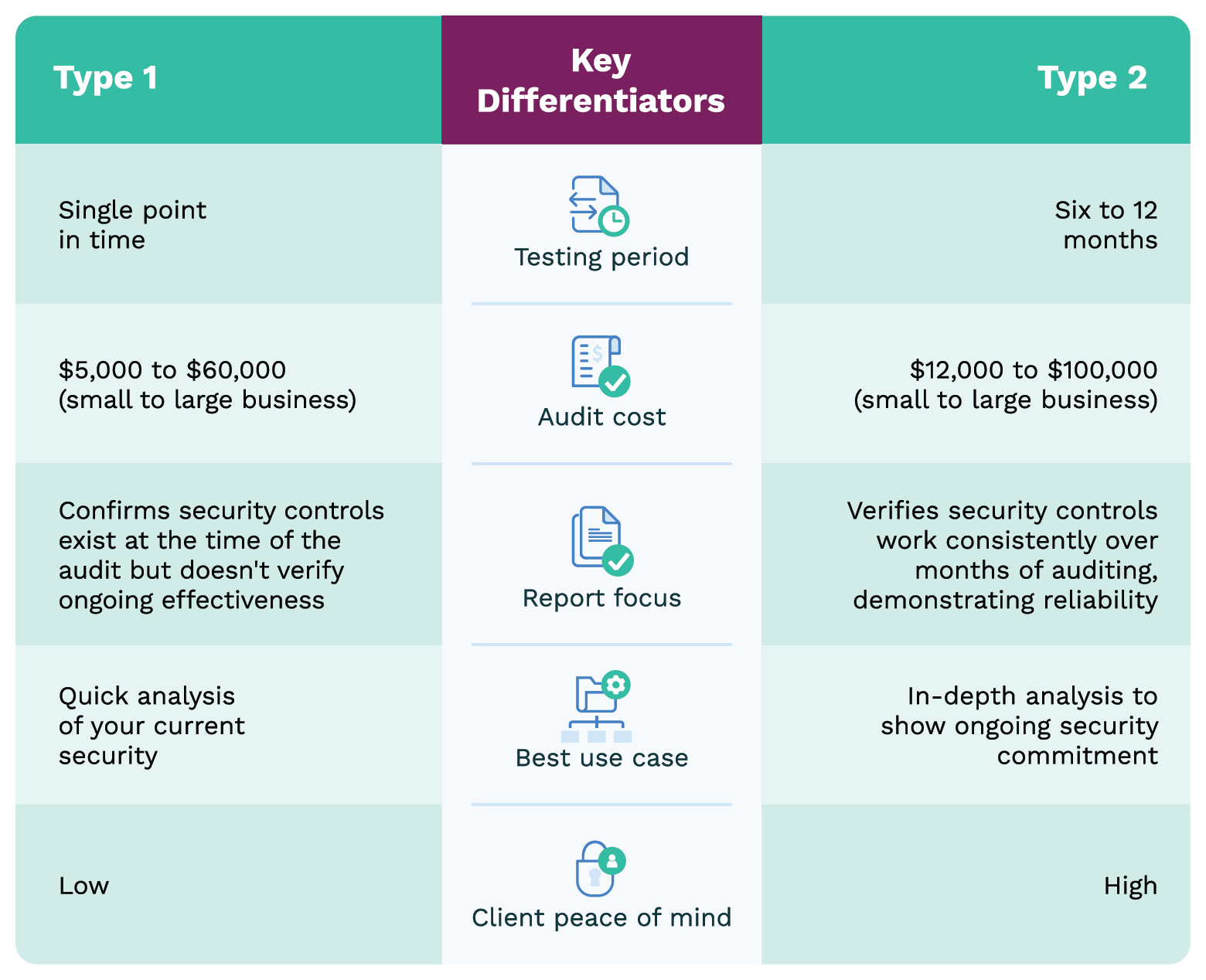
When evaluating archive systems, ask: ‘Is it SOC 2 Type 2?’ Type 1 only proves controls existed on one day. Type 2 proves they worked continuously over months—what regulators and sophisticated clients expect.
The Complete Connected Workflow
This brings us full circle to where we started. Tax preparation isn’t five separate processes — it’s one connected workflow where each stage enables the next. We’ll show you how to build this at your firm in the next chapter.
Dawn Brolin: Success Story
Dawn Brolin, CPA, CFE, and CEO of Powerful Accounting, faced a choice that every modern firm confronts: stick with filing cabinets and paper, or create what she calls a “single source of truth” for long-term document management.
“I didn’t want file cabinets. I didn’t want to have the burden of paper. I wanted the ability to move and travel whenever I wanted to,” Dawn explains. Her decision went deeper than convenience. It was about building a sustainable archive system that could handle compliance, growth, and the unexpected.
The impact became clear during a client emergency. “I was out of the office, and a client texted me a question. I was able to go into SmartVault, access their tax return, and quickly answer the question while using just my phone.” What made this possible wasn’t just cloud access — it was having 12 years of client documents properly archived and instantly searchable. This systematic approach to archiving pays dividends during busy periods and audits alike.
The compliance benefits became essential as regulations tightened. “Security is paramount. With regulations like Pub 4557, we’re required to have secure document storage. I rely on SmartVault to have that secure place for myself and my clients.”
But Dawn’s “single source of truth” creates advantages beyond compliance. “What I love about having SmartVault as our single source of truth for clients specifically is that all their source documents are easily accessible. If they need copies of tax returns to buy a home, they can quickly go into SmartVault and find what they need, all without our assistance.”
The operational impact extends to her entire team. “If a client calls with a question while I’m away, my team doesn’t have to track me down or wait for my return. They can go directly into SmartVault, find exactly what they need, and keep projects moving forward. No bottlenecks, no delays—just continuous, efficient client service.”
After more than a decade of systematic archiving, Dawn’s conclusion is clear: “If you want time back, then you need to create a single source of truth that’s consistently organized and easily accessible across your firm and clients. Of course, you need to ensure security and compliance. I’ve accomplished all of this with SmartVault.”
Conclusion: Your Connected Workflow
Remember that CPA who texted during the earthquake, thinking, “Finally—no more deadlines”? That could have been you. Maybe it already has been.
But that doesn’t have to be your future.
Every firm featured in this ebook started where you are now: scattered documents, frustrated clients, burned-out staff, and disconnected systems creating friction at every handoff. What changed everything wasn’t working harder or hiring more people. It was connecting their entire tax workflow.
SmartVault wasn’t built to be another app in your stack. It was built to be the backbone of your workflow, connecting engagement, collection, prep & review, delivery, and archive into one secure, seamless system. It integrates effortlessly with your tax prep and other core applications so your firm can finally work the way you’ve always wanted: faster, smarter, and without the burnout.
One connected platform. One secure system. One smarter way to work.
That’s the SmartVault difference.

The results? Greater efficiency, lower costs, and happier clients. Your team works with less stress and more focus. And most importantly, you gain freedom — less chasing, less rework, and more time for what really matters: serving clients, growing your firm, and getting your life back during tax season.