









Document Management vs. File Storage: What Small Tax Firms Need to Know
If you run a solo tax practice — or a small firm with just a handful of people — your document processes probably feel fine.
You know where things are. Your folder structure makes sense, your team can usually find what they need, and you recognize file names at a glance because you were there when they were created. You remember what changed and when, which copy was sent to the client, even the offhand comment a client made that explains why this year’s document looks different from last year’s.
In other words, you’re the system. It works because you work.
And for a while, that feels like enough. Since you’re close to every client and every return, file storage does exactly what it promises to do: it stores files.
The problem is that this setup creates a very believable illusion: you feel like you have control because you can retrieve what you need when you need it.
What you actually have is familiarity, a mental map of your firm’s documents that lives in your head more than it lives in your tools.
Familiarity isn’t a flaw. It’s how most small firms survive busy season. But it quietly masks gaps that don’t show up until you’re moving faster, adding staff, trying to take time off, or thinking seriously about what the firm looks like a year or two from now.
Finding files isn’t the same as managing documents
Small tax firms trip up on this assumption: “If I can find documents when I need them, my system is working.”
Not quite, even though it feels reasonable, especially since access is the visible problem most firms are trying to solve.
But finding a file isn’t the same as being able to trust it, govern it, or run a firm around it. In most cases, it simply means you remember where you put it.
When the owner is involved in every return and every client interaction, they quietly compensate for what the system doesn’t do. You know whether a document is complete. You remember that the client sent an updated form after the first upload. You can tell what’s current because you were there when it happened.
That’s why small firms can feel “fine” for so long.
But there’s a difference worth naming: familiarity is personal. It requires you to be present. Control is structural. It lives in the system and keeps working whether you’re there or not.
The hidden cost of retrieval (and why it’s not actually free)
Retrieval sounds straightforward: search, open, move on. But in a familiarity-based workflow, “retrieval” usually includes something else: reconstruction.
Every time you open a document, you’re also rebuilding context around it. Is this complete? Is this the file we’re supposed to use right now? Has anything changed since it came in? Was it already shared? Is it signed? Does it match what we finalized?
If you’re the owner, you do this so quickly you barely notice it happening. Your brain fills in the gaps, which is why the system can feel smooth and efficient.
The cost shows up when that mental context isn’t available — because you’re slammed, time has passed, someone else is looking, or the firm is moving faster than memory can keep up.
Then “finding a file” turns into checking email threads, comparing timestamps, opening multiple folders, or hesitating before you hit send. It’s small friction, but it’s constant — and constant friction is exactly what small firms can least afford.
The test every small firm should take
Here’s how you know you’ve outgrown familiarity-based storage:
If you took a full week off tomorrow — no email, no phone, no check-ins —could the firm operate smoothly?
Could your team locate client documents with confidence? Could work keep moving without constant questions about where things are or what’s correct? Could a client find a document they need on their own, without contacting you?
If there’s even a hint of hesitation, your firm has outgrown familiarity as a foundation. You’ve reached the point where what got you here won’t get you where you want to go next.
What happens when familiarity is your only defense
When the owner’s familiarity is the system, a few vulnerabilities compound.
Over time, operational consistency breaks down. Folder structures drift. Naming conventions erode. Even strong processes become optional when deadlines hit. The system works best for the person who built it and feels increasingly confusing to everyone else, especially when you bring on administrative help or seasonal staff. What felt organized to you can feel chaotic to them.
Sharing also becomes informal because it’s faster: links, attachments, quick forwards, “just grab it from this folder.” Intentions are good, but intention isn’t a control mechanism. When you’re handling Social Security numbers, bank details, and tax returns, knowing who can access what — and keeping that consistent — matters more than convenience. Basic file storage doesn’t always give you clear visibility or guardrails, which means you’re relying on everyone to be careful and hoping nothing slips.
Then there’s the long tail: retention and accountability. Even the smallest firms have real responsibilities around record retention and protecting sensitive client data. When retention lives in habit instead of policy and system logic, inconsistency creeps in — especially as tools change, folders evolve, or staff turns over. Most of the time, everything is fine. But “probably” isn’t the same as “provably.” When something goes wrong —a client dispute, an internal question, a security concern — you don’t want to be reconstructing history from scraps.
Finally, there’s continuity. This is the vulnerability small firms rarely think about early enough. If your document system works because you understand it, the firm becomes harder to delegate, harder to scale, and harder to step away from, even temporarily. Want to take a real vacation? Bring in a partner someday? Eventually exit? Every one of those scenarios gets easier when the firm’s organizational memory lives in a system others can rely on.
What document management actually does (and why SmartVault is built for you)
File storage is designed to do one thing well: keep files accessible.
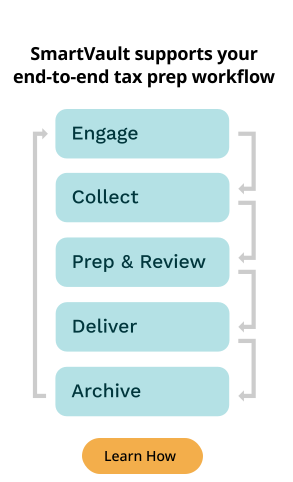
Document management is designed to support how work actually moves through a tax firm—intake, review, collaboration, secure sharing, signing, retention, and the ability to answer questions later without guesswork.
A document management system doesn’t just store files in a more organized way. It removes the burden of being the system.
For small tax and accounting firms, that means consistent organization without constant vigilance, better control over access to sensitive client data, smoother collaboration, and a workflow that stays reliable as the firm grows.
SmartVault is built specifically for this — purpose-built for tax and accounting firms that need real document management without enterprise complexity. In practice, that looks like:
- Client portals that let clients upload and retrieve documents on their own, so you’re no longer the middleman for every “can you send me last year’s return?” request.
- SmartRequestAI to streamline client intake—guiding clients through what’s needed, surfacing what’s missing, and helping you stay organized without chasing documents across email threads.
- Consistent folder structures based on templates you set once, so your files don’t drift based on who saved what during a deadline crunch.
SmartVault also supports strong security and documentation practices — including encryption, role-based access controls, audit trail capabilities, and independently audited controls (SOC 2 Type II) — to help you manage sensitive data with more confidence.
The transformation is straightforward: you stop being the bottleneck. Your team operates without needing you to be the source of truth for everything. And your firm runs on a system designed to support you — not one that only works because you’re constantly holding it together.
Ready to see what changes when your firm stops relying on familiarity and starts operating with real document management? Schedule a demo today.