









SmartRequestAI builds each client’s questionnaire from their prior-year return, follows up until they respond, and assembles every answer and document into bookmarked workpapers inside SmartVault.
No chasing. No rebuilding binders. No intake chaos. The AI-powered Collect stage of SmartVault’s Connected Tax Prep Workflow.
SmartRequestAI®
Turn Client Intake into Organized Tax Work, Automatically

Collect
SmartRequestAI
Prep-Ready
Recently Processed
0 filed
AI Processing Active
0 docs scanned
1 reminders sent
Through August 31st
Get 15% off — that’s $375 in savings heading into next season. 15% discount applies to purchases of 200 or more SmartRequestAI requests made on or before August 31, 2026. Minimum bundle required.
Why SmartRequestAI
Intake That Builds the Foundation of Your Workpapers
SmartRequestAI doesn’t just collect documents. It removes the back-and-forth and manual rework that slows down every return, using prior-year data to guide structured intake and organize files into SmartVault.
The Problem
Document Collection Is Where Tax Season Slows Down
- Chasing documents. Chasing clients.
- Follow-ups. Missing files. Duplicate uploads.
- Emails, portals, and spreadsheets that don't connect.
- Staff spend hours collecting and re-organizing before prep begins.
- By the time workpapers are built, the real work hasn't started.
The Solution
SmartRequestAI Eliminates the Manual Work Before Prep Begins
- Questionnaires and document lists built from each client's prior-year return.
- Uploads filed into your existing SmartVault folder structure, organized by request section.
- Automated Reminders follow up until clients submit, no staff involvement required.
- Every answer and document assembled into bookmarked, prep-ready workpapers.
How It Works
Three Steps to Prep-Ready Documents
SmartRequestAI uses prior-year returns to guide structured intake and automatically organize documents into SmartVault — so your team starts prep immediately.
1
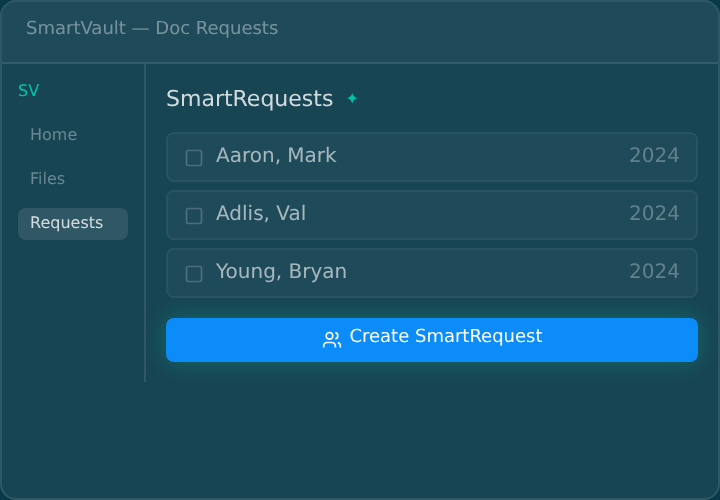
Create a Request
SmartRequestAI reads each client’s tagged prior-year return already stored in SmartVault and generates a personalized questionnaire and document list. Once sent, Automated Reminders owns the follow-up until the client submits.
2
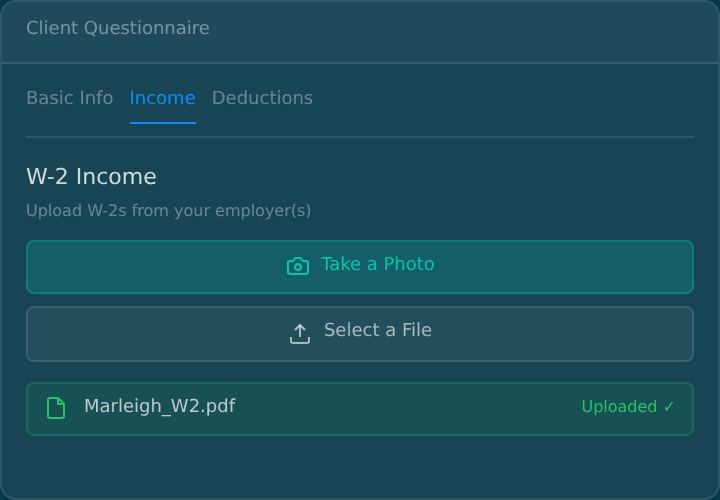
AI Personalizes Every Request
Clients open a secure link, confirm pre-filled information, and answer only the questions that match their situation. They upload from any device, and SmartScan turns phone photos into clean PDFs. No new login, nothing to learn.
3
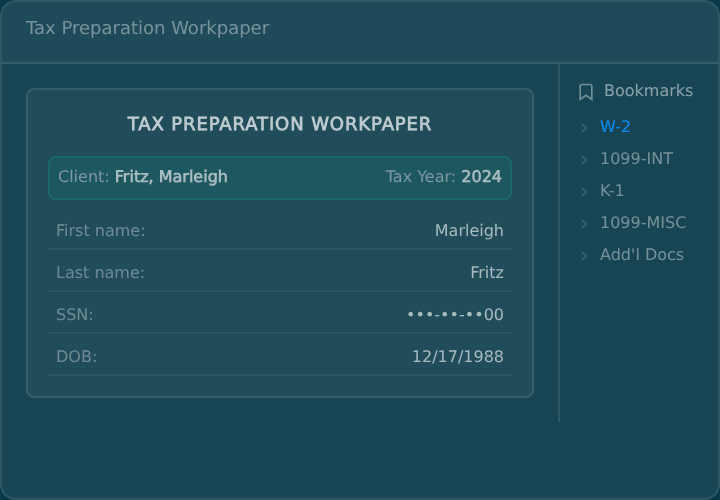
Prep-Ready from Day One
Every answer and document assembles into bookmarked workpapers, filed automatically in the client’s folder. One click takes your preparer straight to the W-2. No renaming files, no rebuilding binders.
The Difference
What Actually Happens After Clients Upload Documents?
Every intake tool collects files. The real question is what happens next, and that’s where most tools stop and your staff picks up the slack.
Client Uploads Documents
Tax documents arrive via portal or email.
With Point Tools
ManualStored Temporarily
Files land in a generic inbox or third-party holding zone — disconnected from your DMS.
Reorganized Manually
Staff sorts, renames, and moves each file by hand. Every. Single. Return.
Rebuilt into Workpapers
Documents are reconstructed into binders or workpapers before prep can begin.
Result
Prep can’t start until staff manually reconstructs every client’s file set — adding 60–90 minutes per return.
With SmartRequestAI
AutomatedPersonalized Before the Client Sees It
SmartRequestAI extracts data from each client's prior-year return and pre-populates their questionnaire automatically. Clients confirm, update, and upload.
Routed to Structured Folders
Every upload files automatically into the client's tax engagement folder in SmartVault, organized by request section.
Prep-Ready in Your System of Record
Answers and documents compile into bookmarked workpapers in your system of record. One click takes a preparer to any form.
Result
Every document is classified, routed, and waiting in your system of record — prep starts the moment intake closes.
Most Tools Optimize a Step. SmartVault Owns the Workflow.
Each bar shows how far a tool reaches across the document lifecycle.
Stanford Tax
No DMS, no workflow past intake
Collect
Filed
Requires separate document infrastructure
Collect
Prep & Review
Truss
Not the system of record
Engage
Collect
Prep & Review
Deliver
Thomson Reuters
Enterprise lock-in, out of reach for SMB
Collect
Prep & Review
Deliver
Archive
SmartVault
+ SmartRequestAI
Engage
Collect
Prep & Review
Deliver
System of Record
Every tool adds AI to the intake problem. None of them own the document. SmartVault owns the document — SmartRequestAI is what that unlocks.
ROI Impact
Reclaim 60 to 90 Minutes Per Return
During tax season, your bottleneck isn’t software — it’s time, follow-ups, and rework. SmartRequestAI gives your firm meaningful in-season capacity without hiring. Because it runs inside SmartVault, adoption is faster and friction is lower than layering another tool into your stack.
500
hours
reclaimed at 60 min/return*
750
hours
reclaimed at 90 min/return*
*Based on a firm processing 500 returns per season.
Before You Compare AI Tools, Compare Foundations
AI layered on a point tool optimizes one step. AI running inside your document platform carries the work from first request through final archive.
Tier 1
Point AI Tools
AI organizers layered onto your existing stack
- Collects documents
- Auto-categorization
- Integrated with your DMS
- Workflow continuity
- System of record
Tier 2
Embedded Ecosystem AI
AI locked inside a single tax software vendor
- Collects documents
- Auto-categorization
- Integrated with your DMS
- Workflow continuity
- System of record
Tier 3
Connected Platform AI
AI running inside your document management platform — powering the full workflow
- Collects documents
- Auto-categorization
- Integrated with your DMS
- Workflow continuity
- System of record
SmartRequestAI operates here
Security Architecture
Closed-loop AI. Your data never leaves the vault.
Not all AI is built the same. SmartVault's closed-loop architecture keeps every document, every interaction, and every AI decision inside a single secure ecosystem.
SmartVault
Closed-Loop Architecture
-
Data Stays In Ecosystem
Data extraction runs inside SmartVault's certified environment.
-
Audit-Ready Compliance
Every action in SmartRequestAI is captured in the activity log and fully auditable. SOC 2 compliant end-to-end.
-
Architected to Reduce Risk
Customer data is never used to train the model. No external API Calls. Fewer integration points means fewer vulnerabilities.
Point Solutions
Open-Loop Risk
-
Data Leaves Your Control
Documents are sent to an external LLM for processing, you lose control over where the client data is processed and stored.
-
Compliance Gaps
AI actions happen outside your document audit trail. Hard to prove chain of custody or meet regulatory requirements.
-
Expanded Risk
AI supported actions happen outside your document audit trail. Hard to prove chain of custody or meet regulatory requirements.
Security Features
Advanced encryption
Role-based permissions
Audit-ready activity logs
Structured retention policies
No third-party document routing
SOC 2 Type II compliant
Bottom line: Your clients’ data deserves the same standard of care you give their returns. When a client, an insurer, or an IRS letter asks how their information is handled, your answer is one sentence. It never left the platform.
Where SmartVault Fits in Your Tax Prep Workflow
SmartRequestAI powers the Collect stage, so answers and documents arrive organized by request, filed in the client’s folder, and assembled into workpapers before prep begins. It’s not a point solution — it’s the engine that activates the entire workflow.
Where most workflow tools break
After intake, firms return to fragmented storage and disconnected portals — with no system of record underneath.
See how SmartVault compares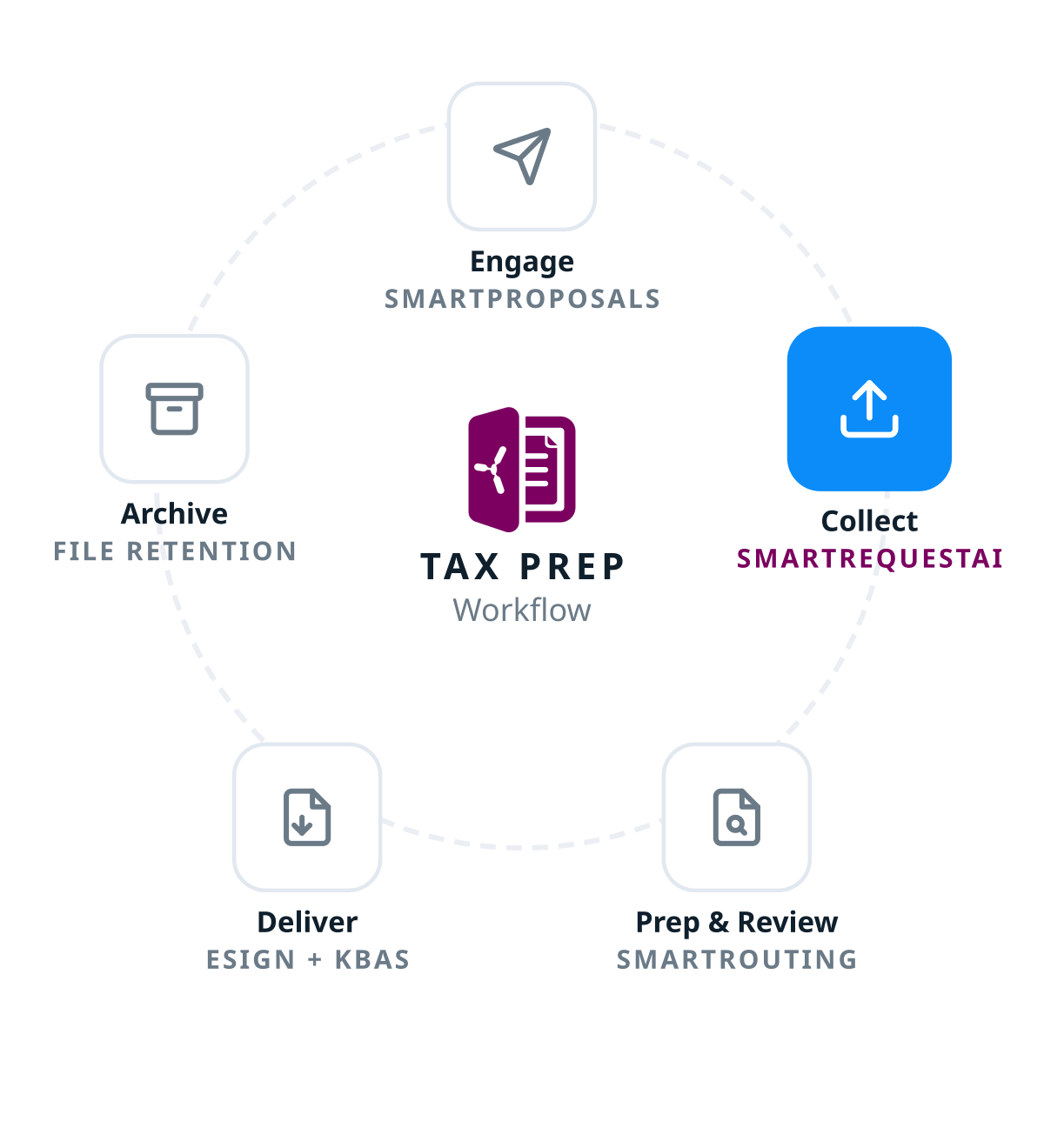
SOC 2 Type 2
FTC Safeguards
IRS 4557 Compliant
Integrations
Connects with the Tools You Already Use
From tax prep to eSignature to practice management — seamless connections across your entire tech stack.




Go deeper
Related Resources
SmartRequestAI has automated document collection for firms nationwide, read our case studies to learn more.




Frequently Asked Questions
Have Questions? We’ve Got Answers.
We’ve compiled answers to the most common questions about SmartRequestAI in the section to the right. These cover the key details about functionality, implementation, and getting started with SRAI.
-
How exactly does SmartRequestAI create personalized document requests?
SmartRequestAI combines two key inputs: the prior-year tax return already stored in SmartVault and linked to the correct client record (referred to as a tagged return) and your firm’s customizable questionnaire template. By analyzing what appeared on last year’s return, it automatically generates a pre-populated questionnaire unique to each client. No more generic checklists that don’t match their situation.
-
What if my firm does not have prior-year tax returns stored in SmartVault yet?
This works for brand-new clients too. Collect their prior-year return, upload it into SmartVault, and tag it, and SmartRequestAI reads it the same as a return printed from your tax software. The rule is simple. If a prior-year return exists in the client’s folder, the questionnaire populates from it. If it doesn’t, the request still sends, the questionnaire just starts blank.
-
What does the client experience actually look like?
It is simple and fast as clients receive a secure email link or can log into the SmartVault portal to complete their Smart Request. They’re guided step-by-step through a clean, personalized questionnaire, making it easy to know exactly what documents to upload.
-
What happens if a client doesn't respond to their document request?
SmartVault’s Automated Reminders handles the follow-up. When you send a Smart Request, a reminder cadence starts on the schedule you choose and continues until the client submits, then stops automatically. Your staff never sends a chase email, and you can see each client’s reminder status right on the dashboard.
-
Can clients use SmartRequestAI on their phones?
Absolutely. SmartVault is fully mobile-friendly, and clients can complete their Smart Request from any device. With built-in SmartScan functionality, they can even snap photos of documents with their phone and automatically upload them as high-quality PDFs. No more blurry photos, HEIC files, or unusable scans.
-
Can my firm staff update or complete requests on behalf of clients?
Yes. Firm users can update answers or upload documents directly on behalf of clients. This is particularly helpful when clients need assistance or when you receive documents through other channels and want to keep everything centralized in SmartRequestAI.
-
How secure is SmartRequestAI?
SmartRequestAI is built inside SmartVault’s SOC 2 Type 2–compliant environment, so your firm stays audit-ready and in control of sensitive data. Clients complete requests through the same secure portal they already know and trust, giving them peace of mind while protecting your compliance requirements.
-
Does the AI train on our client data?
Never. SmartRequestAI uses private AI models that don’t train on your data. Your firm’s information is never used to improve the model, never shared with others, and never exposed to public internet traffic. It’s designed specifically for accounting firms who need AI that respects data privacy.
-
How much control do I have over the questionnaire template?
Full control. The SmartRequest template allows firm admin users to:
- Show or hide questions – Hidden questions are automatically excluded from AI data extraction and won’t be prefilled
- Add custom questions under the “Other” section to tailor questionnaires for your specific workflows
- Navigate easily through sections (Basic Info, Income, Deductions, etc.) with clear labels and descriptions
This ensures every SmartRequest reflects your firm’s specific engagement needs and information requirements.
-
What happens to the documents clients upload?
Documents automatically flow into the Doc Requests folder within the client’s tax engagement in SmartVault for the relevant tax year. Each source document is saved individually, so your team can access any file on its own, and everything is also compiled into a single consolidated source documents workpaper with automatic bookmarks for easy navigation. No manual sorting, no hunting for files across different systems.
-
How much time does SmartRequestAI actually save?
Firms typically save 60–90 minutes per return, time you can reinvest into higher-value work or serving more clients without adding staff. For clients, it means fewer back-and-forth emails and faster turnaround on their returns, which builds confidence in your process.
-
How is SmartRequestAI different from standalone intake tools like Soraban or Stanford Tax?
The key difference is integration, security, and cost. SmartRequestAI is built directly into SmartVault’s SOC Type 2 compliant environment, meaning your firm and your client’s data are protected by a platform that undergoes a rigorous 12-month security audit every year.
Since SmartRequestAI lives inside SmartVault, the documents clients submit flow directly into the correct client folder with no manual handoff and no exposure to additional third party systems. With standalone tools, documents collected during intake still need to go somewhere, which means another vendor, another portal, another system touching sensitive client data.
Standalone intake tools charge per returns with minimums and separate storage costs. SmartRequestAI is built inside the platform where your documents already live.
-
Is SmartRequestAI included with my current SmartVault subscription?
SmartRequestAI requests are purchased in bundles of 50 and added to your existing Accounting Pro or Accounting Unlimited subscription. Once purchased, requests never expire and carry forward year to year.
Still have questions?
If you don’t find the answer to your specific question, contact us.
Upgrade the Workflow. Not Just the Tool.
Turn intake into infrastructure.
Start prep with every document already organized. Keep every document inside your system of record from first request through final archive.
Start prep with every document already organized. Keep every document inside your system of record from first request through final archive.