






The ProConnect Document Management System & Client Portal

Key Benefits for ProConnect Users
Five ways SmartVault transforms tax prep inside Intuit ProConnect.
1-Click Integration
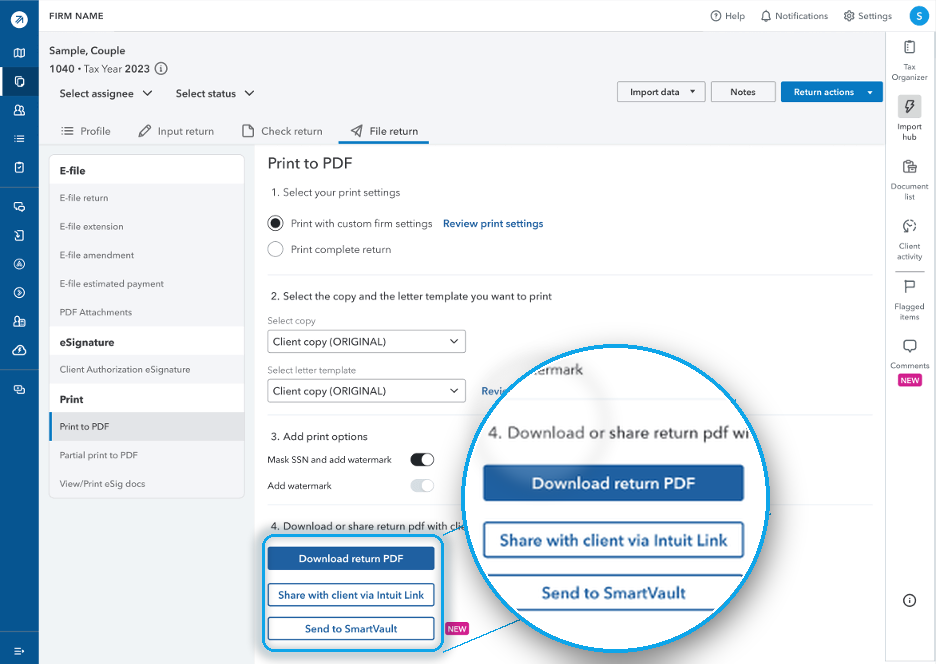
SmartVault connects directly to ProConnect. Print a return and it files itself to the right client folder. Create a SmartRequest and client details import automatically, so prep starts organized instead of scattered.
- Client details, dependents, and last year’s income and deduction sources are pulled directly from ProConnect
- SmartRequestAI, our AI-powered intake and prep tool, builds custom document request lists and custom questionnaires, prefilling known info to reduce intake time
- Returns route straight to the correct client folder, filed and named
- Client documents come in through a secure portal,completed questionnaire data pushes back into ProConnect in one click
- Connects to QuickBooks Online, so bookkeeping documents and tax documents live in one client folder

The Only Integrated Tax Automation Platform Built For ProConnect
With the SmartVault ProConnect DMS:
- Every return files to the right client folder, matched by client ID, not name
- Move returns between ProConnect and SmartVault in one click, no downloading or renaming
- SmartRequestAI pulls prior-year data from ProConnect to build each client’s request list and custom questionnaire
- Maintain structure with consistent folder naming and tax-year organization
- Clients upload through a secure portal, no email attachments to chase
From Prior Year Data to a Draft Return in ProConnect
A four-stage view of how client data from ProConnect becomes a prep-ready workpaper today, with one-click data push back into ProConnect.
Prior year data pulls in automatically, before anyone touches a file.
SmartRequestAI collects prior year data automatically from ProConnect and builds a personalized questionnaire from it, so clients start from something mostly filled in, confirming what’s known instead of re-entering it. Reminders handle the follow-up, so no return stalls waiting on one client.

Every client gets their own custom request, built from what they filed last year.
SmartRequestAI turns prior year data into a document request list and questionnaire specific to that client, so nothing gets requested that’s already known and nothing gets missed.

Every answer and document lands in one prep-ready workpaper, automatically.
As clients respond, SmartRequestAI assembles their answers and documents into a bookmarked, prep-ready workpaper inside SmartVault, so nothing waits until intake closes to get organized.

The finished workpaper creates the draft return back in ProConnect.
Once the workpaper is complete, it returns to ProConnect and creates the draft return, ready for the CPA to review. No retyping the workpaper into the return, no manual data entry.

You Knew Us For Document Storage. See the Full ProConnect Workflow
Get signed and paid before prep starts with SmartProposal
SmartProposal (Q1 2027) puts pricing, signature, and payment in one link. Nothing about starting an engagement is manual.
- A clear proposal with tiered options in the portal
- One link for pricing tiers, the signature, and the deposit, not three separate steps
- Builds and sends the proposal from a reusable template in minutes
- Know exactly where every engagement stands, signed, paid, or still waiting, without asking
Requests prefill from ProConnect, reminders do the chasing
SmartRequestAI pulls each client’s prior year data automatically from ProConnect, then builds a personalized document request list and custom questionnaire instead of handing clients a blank request. Automated reminders follow up until they submit, so nothing waits on staff.
- Personalized request, built from prior year data, not a generic organizer
- Branded, mobile-friendly portal, no new login required
- Automated reminders follow up until clients submit
- Every upload files itself into the client’s SmartVault folder automatically
One click data push turns the workpaper into a draft return
SmartRequestAI assembles a prep-ready workpaper automatically as clients respond, no manual sorting or filing. When it’s complete, one click sends it into ProConnect and creates the draft return, so your team’s time goes to technical accuracy, not data entry.
- Prep-ready workpaper assembled automatically as answers and documents come in
- One-click push sends the workpaper straight into ProConnect
- Draft return creates itself, no manual re-entry
- Every return lives in one central workspace, nothing scattered across tools, reducing risk
Payment clears before the return reaches the client
Release returns and capture eSignatures in one flow, and require payment before release whenever your firm chooses.
- 8879 eSignature built into the delivery flow
- Payment collected before the return releases, when the firm requires it
- Branded portal keeps delivery consistent with the firm, not a generic email attachment
- Automatic notifications tell the client the moment their return is ready
Every return stays retrievable and audit-ready
Search any client, any tax year, in seconds, with a full audit trail showing exactly who touched what, when.
- Global search across every client and every tax year
- Full audit trail with role-based permissions
- Prior year returns pulled up instantly for advisory conversations
- Automated retention rules so nothing gets held longer than it has to be
Switching from Intuit DMS or another DMS? A specialist guides the move, start to finish.
Intuit DMS migrations don't require you to extract files into a Windows folder structure first — we handle it.

Migration Consultation
Meet with a SmartVault specialist to review your current data structure, then align on timeline, next steps, and expectations for moving into SmartVault.

Data Upload & Client Matching
Use the Assisted Migration Wizard to upload your data, then run a guided client matching exercise so every document lands in the correct client vault.

Disbursement & Verification
We distribute documents into client vaults and run a clean-up pass to verify your data is organized, accessible, and ready for your team.
*Clients are typically responsible for extracting data into a Windows folder structure prior to upload. Intuit DMS and SmartVault-to-SmartVault migrations are exceptions — no manual extraction required.

Why SmartVault is the Backbone of a Secure, Compliant, and Efficient Tax Workflow
Collect Without the Chase
SmartRequestAI builds personalized requests from prior-year returns, reminds clients until they submit, and delivers bookmarked workpapers.
Learn MoreStrengthen Security & Compliance
SOC 2 Type 2 audited, AES-256 encryption, helps firms meet FTC Safeguards and IRS 4557.
Learn MoreEnhance Client Collaboration
Secure, custom-branded client portal for sharing files, requesting documents, and collecting eSignatures.
Learn MoreSave 60-90 Minutes Per Return
Use our ROI calculator to see how many hours and dollars your firm can save by going paperless with SmartVault.
Learn MoreUnlimited Storage & Scalability
No limits on clients, storage, or folders.
Learn MoreReduce Admin Overhead
Auto-file returns, route documents, and track client approvals.
Learn MoreTrusted by Intuit. Proven by Tax Pros.

"We are committed to enabling a best-of-breed ecosystem of apps that bring high-value capabilities to our customers. SmartVault has been a leading provider of document management solutions to the accounting industry and Intuit customers for over ten years."

Jorge Olavarrieta
VP and GM of Intuit ProTax Group
What is intake time worth to your firm?
Assumes ~75 minutes saved per return and a blended staff rate of $85/hour. These results are estimates. A SmartVault specialist can walk through the exact savings for your firm.
Why 30,000 Accounting and Business Professionals Trust SmartVault
SmartVault supports over 3 million users, securely stores over 500 million documents, and has facilitated hundreds of thousands of signatures.
Plans Built for ProConnect Tax Pros
Get secure document management, a built-in client portal, and automated workflows, fully integrated inside ProConnect.
Choose the plan that fits your firm’s size, goals, and growth path.
ProConnect Docs
Best for solo preparers using ProConnect who need secure, integrated document management without the extras.
1 user only
(billed annually)
Core Features
-
Unlimited cloud-based storage
-
Custom branded client portal
-
Advanced Security & Compliance
-
Unlimited clients & external collaborators
-
Customized folder templates
-
U.S. based phone/email/chat support
Accounting Pro
Best for small to mid-sized firms that need stronger security, compliance, and workflow automation.
2 user minimum
(billed annually)
Includes All Core Features +
-
Advanced document routing
-
Robust workflow automation
-
Custom document request list
-
Assign specific clients to employees
-
Works with SmartRequestAI®, bundles sold separately
-
SmartProposal coming Q1 2027, price and propose with confidence
Accounting Unlimited
Best for high-volume or growing firms that need unlimited eSignatures with KBAs and advanced workflow support.
2 user minimum
(billed annually)
Includes All Accounting Pro Features +
-
Request & send unlimited eSignatures
-
Unlimited KBAs / ID verification
-
Unlimited PDF form fillers
-
Send unlimited quotes & proposals
-
Compliance Vault (WISP templates)
Pricing tailored to your firm's volume.
Stop Chasing Documents
Eliminate the back-and-forth of document collection with AI-powered intake built directly inside SmartVault.
- Prior-year returns generate a personalized document request list
- Automated follow-ups & status tracking
- Documents automatically routed into client folders
- Works inside your existing SmartVault workflow
- Closed-loop, SOC 2 Type 2 compliant — client data never leaves the vault
Available as an add-on to Accounting Pro and Accounting Unlimited annual plans.
SmartRequestAI Bundles
Simple per-return pricing — save more as your volume grows.
$750 per bundle
No long-term contract · Requests never expire
Security Is Not an Add-On. It Is the Foundation.
Purpose-built to protect sensitive client data, maintain audit readiness, and meet the highest regulatory standards.
Built to Protect Your Firm and Your Clients
Every workflow — from document collection to client delivery — runs inside SmartVault’s certified, compliance-ready infrastructure.
- Structured folder architecture with enforced naming
- Granular role-based permissions with MFA
- Version control & full audit trail on every document
- Automated retention & compliance policies
- Immutable, timestamped activity logs
SOC 2 Type 2
Continuously audited over 6–12 months
ISO 27001 & 22301
Certified data security & business continuity
IRS 4557 & FTC Safeguards
Aligned with IRS data security plans & FTC Safeguards Rule requirements
AES-256 Encryption
Bank-grade encryption protects data at rest and in transit
Let’s Map Your Firm’s Workflow Together.
- 15-minute discovery call, on your calendar
- A live look at the workflow for your firm size
- Straightforward pricing and migration options
"*" indicates required fields
Intuit ProConnect + SmartVault FAQs
Common questions about the ProConnect + SmartVault integration, security, and pricing.
-
Can I add users to the ProConnect Docs plan?
No. ProConnect Docs is a single-user plan. Upgrade to Accounting Pro or Accounting Unlimited to add team members. Costs are prorated.
-
Can I migrate from Lacerte or ProSeries?
Yes. SmartVault retains client folder structure and connects past returns seamlessly to ProConnect.
-
Is SmartVault officially supported by Intuit?
Yes. SmartVault is the exclusive third-party DMS integrated with ProConnect, ProSeries, and Lacerte.
-
What makes SmartVault more accurate than a standard ProConnect integration when routing returns?
Other integrations route returns based on a simple name match, which breaks down when client names vary slightly across platforms. SmartVault uses a verified one-to-one link tied to each client’s unique identifier in ProConnect. Once matched, every return you print routes to the correct SmartVault client folder automatically, regardless of how the name appears in either system.
-
Is SmartVault secure enough for compliance audits?
Yes. It is SOC 2 Type 2 compliant and meets FTC/IRS document handling standards.
-
What eSignature options do I have with SmartVault?
SmartVault’s eSignature solution is powered by DocuSign and can be added on to Accounting Pro, or enjoy unlimited eSignatures and KBAs included with the Accounting Unlimited plan. If you already have a DocuSign account, you can link it to SmartVault.
-
Does SmartVault + ProConnect work on both Windows and MacOS?
Yes. The SmartVault integration runs in your browser within ProConnect, so it is fully compatible with both Windows and MacOS.
-
How does SmartRequestAI compare to Intuit Link?
Intuit Link collects documents. SmartRequestAI handles the whole arc inside the platform where your ProConnect returns already live. It builds each client’s questionnaire from their prior-year return, follows up until they submit, files every upload in the client folder, and assembles bookmarked workpapers, ready for prep. Documents don’t just arrive, they come out the other side as prep-ready work.
-
What can clients do inside the ProConnect client portal?
Clients use the portal to upload documents, respond to SmartRequestAI requests, and eSign their completed return — all under your firm’s own branding. There’s no separate login system to manage; it’s the same portal your firm already uses for document collection and delivery.
-
How much does SmartVault cost for ProConnect users?
SmartVault offers three plans built for ProConnect firms: ProConnect Docs ($68/month, single user), Accounting Pro ($65/user/month, 2-user minimum), and Accounting Unlimited ($85/user/month, 2-user minimum). All plans include unlimited cloud storage, a branded client portal, and advanced security. Accounting Pro and Unlimited add workflow automation, document routing, and eSignature options — see the full plan comparison above for details.
-
Is SmartRequestAI included in my plan, or is it an add-on?
SmartRequestAI is compatible with SmartVault Accounting Pro and Accounting Unlimited plans with request bundles sold as add-ons. Requests come in bundles and never expire, volume discounts are available. Talk to your account team for specific pricing for your firm’s volume.
-
How long does it take to set up SmartVault with ProConnect?
Most firms are up and running with the core ProConnect integration in 2 to 3 weeks. Firms migrating existing client data from another DMS typically work with a SmartVault specialist over 2 to 8 weeks, depending on the source system, to ensure folder structures and client matching are handled correctly before go-live.
-
Is there a free trial for SmartVault with ProConnect?
Yes. SmartVault offers a 14-day free trial with guided setup from a product specialist, so you can test the setup, client portal, and document workflows before committing to a play. Request a trial ->
Still have questions?
See how SmartVault works inside ProConnect — book a personalized demo and we'll walk you through the integration, security, and migration.
Resources for Intuit ProConnect Firms
Guides, demos, and insights to help your firm get the most out of SmartVault + Intuit ProConnect Tax Online.