








SmartRequestAI finds each client’s richest available prior year data then builds their custom questionnaire from it. Automated reminders follow up until clients respond, and everything assembles into a bookmarked, prep-ready workpaper inside SmartVault.
The AI-powered Collect and Prep stages of SmartVault’s Connected Tax Prep Workflow.
SmartRequestAI®
Automated Tax Document Collection & Client Intake Software

Collect
SmartRequestAI
Prep-Ready
Recently Processed0 filed
AI Processing Active
0 docs scanned1 reminders sent
SmartRequestAI Solves the Collect Stage
Intake That Organizes Itself As Clients Respond
SmartRequestAI is the automated client tax intake layer of SmartVault, replacing manual chasing with requests that build, follow up, and organize themselves.
The Problem
Document Collection Is Where Tax Season Slows Down
- Chasing documents. Chasing clients.
- Follow-ups. Missing files. Duplicate uploads.
- Emails, portals, and spreadsheets that don't connect.
- Staff spend hours collecting and re-organizing before prep begins.
- By the time workpapers are built, the real work hasn't started.
The Solution
SmartRequestAI Cuts the Manual Work Before Prep Begins
- Questionnaires and document lists built from each client's best available prior-year information, no blank forms to start from.
- Clients confirm, update, and upload from any device through a secure portal
- Automated Reminders follow up until clients submit, without staff time.
- Every upload files into the right client folder as it arrives
How It Works
Three Steps to a Prep-Ready Workpaper
SmartRequestAI finds each client’s richest available prior year data to guide structured intake and automatically organize documents into SmartVault, so prep starts right away.
1
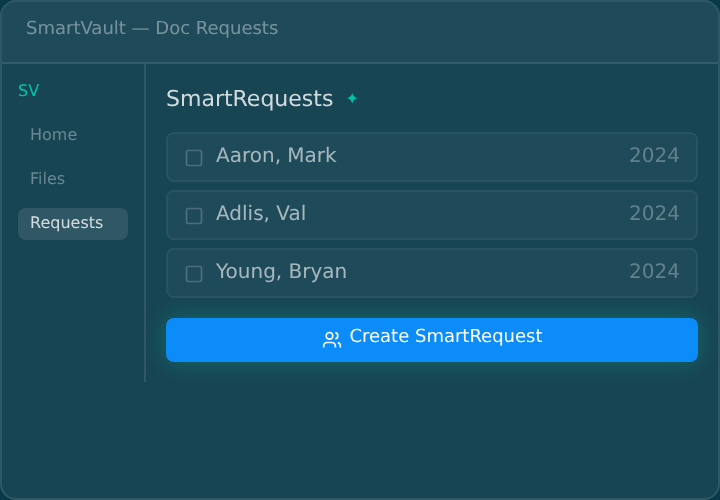
Create a Request
SmartRequestAI starts from the best source it has, client details pulled from ProConnect or Lacerte, last year’s questionnaire answers, or a prior-year 1040, and builds a personalized questionnaire and document list. Automated Reminders handle follow-up until the client submits.
2
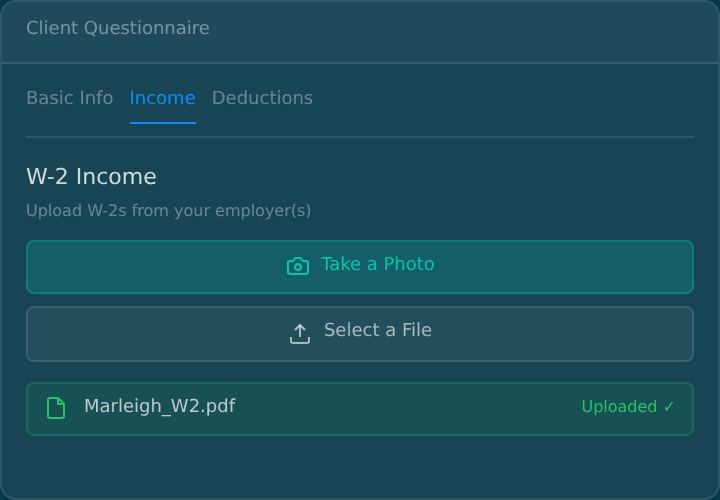
Clients Confirm and Upload
Clients open a secure link, confirm pre-filled information, and answer only the questions that match their situation. They upload from any device, and SmartScan turns phone photos into PDFs. No new login, nothing to learn.
3
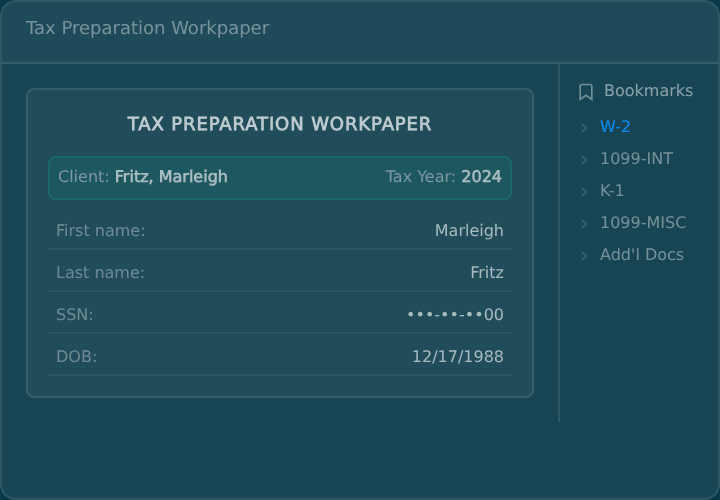
Prep-Ready When Intake Closes
Every answer and document assembles into bookmarked workpapers, filed automatically in the client’s folder. One click takes your preparer straight to the W-2. No renaming files, no rebuilding binders.
SMARTREQUESTAI Powers the Prep Stage
What Your Team Gets When Intake Closes
Every intake tool collects files. Most stop there, and your staff picks up the rest.
Client Uploads Documents
Tax documents arrive via portal or email.
With Point Tools
ManualStored Temporarily
Files land in a generic inbox or third-party holding zone, disconnected from your DMS.
Reorganized Manually
Staff sorts, renames, and moves each file by hand. Every. Single. Return.
Rebuilt into Workpapers
Documents are reconstructed into binders or workpapers before prep can begin.
Result
Prep can’t start until staff manually reconstructs every client’s file set, adding 60–90 minutes per return.
With SmartRequestAI
AutomatedPersonalized Before the Client Sees It
SmartRequestAI pulls data from each client's most complete prior-year records and pre-populates their questionnaire automatically. Clients confirm, update, and upload.
Routed to Structured Folders
Every upload files automatically into the client's tax engagement folder in SmartVault, organized by request section.
Prep-Ready in Your System of Record
Answers and documents compile into bookmarked workpapers in your system of record. One click takes a preparer to any form.
Result
Every document is classified, routed, and waiting in your system of record. Prep starts the moment intake closes, with completed answers pushing back into ProConnect or Lacerte.
SmartRequestAI
Where SmartVault Fits in Your Tax Prep Workflow
A four-stage view of how prior year data moves from intake to a review-ready draft return. Step through each stage to see how client data becomes organized, prep-ready tax work.
Secure by design
Every file stays inside SmartVault
Most Tools Optimize a Step. SmartVault Owns the Workflow.
Each bar shows how far a tool reaches across the document lifecycle.
Stanford Tax
No DMS, no workflow past intake
Collect
Filed
Requires separate document infrastructure
Collect
Prep & Review
Truss
Not the system of record
Engage
Collect
Prep & Review
Deliver
Thomson Reuters
Enterprise lock-in, out of reach for SMB
Collect
Prep & Review
Deliver
Archive
SmartVault
+ SmartRequestAI
Engage
Collect
Prep & Review
Deliver
System of Record
Every tool adds AI to the intake problem. None of them own the document. SmartVault owns the document — SmartRequestAI is what that unlocks.
ROI Impact
Reclaim 60 to 90 Minutes Per Return
During tax season, your bottleneck isn't software. It's time, follow-ups, and rework. SmartRequestAI adds in-season capacity without hiring, and because it runs inside SmartVault, there's no new tool for your team to learn.
500
hours
reclaimed at 60 min/return*
750
hours
reclaimed at 90 min/return*
*Based on a firm processing 500 returns per season.
Before You Compare AI Tools, Compare Foundations
AI layered on a point tool optimizes one step. AI running inside your document platform carries the work from first request through final archive.
Tier 1
Point AI Tools
AI organizers layered onto your existing stack
- Collects documents
- Auto-categorization
- Integrated with your DMS
- Workflow continuity
- System of record
Tier 2
Embedded Ecosystem AI
AI locked inside a single tax software vendor
- Collects documents
- Auto-categorization
- Integrated with your DMS
- Workflow continuity
- System of record
Tier 3
Connected Platform AI
AI running inside your document management platform — powering the full workflow
- Collects documents
- Auto-categorization
- Integrated with your DMS
- Workflow continuity
- System of record
SmartRequestAI operates here
Security Architecture
Closed-loop AI. Your data stays between SmartVault and your tax software.
SmartRequestAI collects and organizes client data inside SmartVault, so intake and prep happen in one secure system of record.
SmartVault
Closed-Loop Architecture
-
Intake and Prep in One Place
SmartRequestAI collects, organizes, and stores client data inside SmartVault, so it isn't spread across separate intake, storage, and handoff tools.
-
Audit-Ready Activity Logs
Every action in SmartRequestAI is captured in the activity log. SmartVault is SOC 2 Type 2, with role-based permissions and structured retention.
-
Architected to Reduce Risk
Fewer separate tools touching client data means fewer vendors to vet and fewer places a breach can start, which lowers the firm's risk.
Point Solutions
Open-Loop Risk
-
Data Leaves Your Control
Documents are sent to an external LLM for processing, you lose control over where the client data is processed and stored.
-
Harder to Prove Chain of Custody
When client data is spread across several tools, showing how it was handled for a client, an insurer, or an IRS letter gets harder.
-
Expanded Risk
Stitching intake, storage, and data entry across separate apps puts client data in more places, each one another vendor to account for.
Security Features
Advanced encryption
Role-based permissions
Audit-ready activity logs
Structured retention policies
No third-party document routing
SOC 2 Type II compliant
Bottom line: Your clients' data deserves the same standard of care you give their returns. When a client, an insurer, or an IRS letter asks how their information is handled, your answer is simple. Collection and prep happened in one closed loop, not scattered across separate tools.
SmartRequestAI
From Prior Year Data to a Draft Return in ProConnect and Lacerte
Built for ProConnect & Lacerte firms first. More tax platforms are on the way.
A four-stage view of how prior year data moves from intake to a review-ready draft return. Step through each stage to see how client data becomes organized, prep-ready tax work.
Prior year data pulls in automatically, before anyone touches a file.
SmartRequestAI collects prior year data automatically from ProConnect and builds a personalized questionnaire from it, so clients start from something mostly filled in, not a blank organizer. Reminders handle the follow-up, so no return stalls waiting on one client.
Parton, Dolly
Tax Year 2025
1040
File return
E-file
E-File Return
E-File Extension
PDF Attachments
eSignature
Client Authorization eSignature
Print to PDF
View/Print eSig Docs
Print options
ImportedCopy
Client copy
Letter template
Original letter
Mask SSN and add watermark
Download Return PDF
Send to SmartVault
Last sent a client copy to SmartVault at 10:54 AM
Every client gets their own request, built from what ProConnect already knows.
SmartRequestAI pulls each client's details, dependents, and last year's income sources from ProConnect and builds a request specific to them. Clients confirm what's known instead of retyping it.
Miscellaneous questions
Please answer all that apply.
Prefilled from 2024Did you make any gifts over $19,000 (or $38,000 with a spouse)?
YesNo
Did you receive, sell, exchange, gift, or dispose of cryptocurrency?
YesNo
Did you have any foreign income or pay any foreign taxes?
YesNo
Do you expect a large fluctuation in income or withholding this year?
YesNo
Every answer and document lands in one prep-ready workpaper, automatically.
As clients respond, SmartRequestAI assembles their answers and documents into a bookmarked, prep-ready workpaper inside SmartVault, so nothing waits until intake closes to get organized.
Bookmarks
Basic info
Income
Rental properties
Deductions
Rental property #1
Address1542 Rochester Trail
CityLeague City
StateTX
Zip code77573
Total rental income received — captured from client response
The finished workpaper creates the draft return back in ProConnect.
Once the workpaper is complete, it returns to ProConnect and creates the draft return, ready for the CPA to review. No retyping the workpaper into the return, no manual data entry.
Send to ProConnect
Are you sure you want to use the data collected from SmartRequestAI to populate fields within Intuit ProConnect Tax?

Draft return created in ProConnect — ready for review
Integrations
Connects with the Tools You Already Use
From tax prep to eSignature to practice management, connected across your tech stack.









Talk to a Specialist
Upgrade the Workflow. Not Just the Tool.
Start prep with every document already organized. Keep every document inside your system of record from first request through final archive.
- 15-minute discovery call, on your calendar
- A live look at the workflow for your firm size
- Straightforward pricing and migration options
"*" indicates required fields
Frequently Asked Questions
Have Questions? We've Got Answers.
We’ve compiled answers to the most common questions about SmartRequestAI in the section to the right. These cover the key details about functionality, implementation, and getting started with SRAI.
-
How exactly does SmartRequestAI create personalized document requests?
SmartRequestAI combines two key inputs: the prior-year tax return already stored in SmartVault and linked to the correct client record (referred to as a tagged return) and your firm’s customizable questionnaire template. By analyzing what appeared on last year’s return, it automatically generates a pre-populated questionnaire unique to each client. No more generic checklists that don’t match their situation.
-
What if my firm does not have prior-year tax returns stored in SmartVault yet?
This works for brand-new clients too. Collect their prior-year return, upload it into SmartVault, and tag it, and SmartRequestAI reads it the same as a return printed from your tax software. The rule is simple. If a prior-year return exists in the client’s folder, the questionnaire populates from it. If it doesn’t, the request still sends, the questionnaire just starts blank.
-
What does the client experience actually look like?
It is simple and fast as clients receive a secure email link or can log into the SmartVault portal to complete their Smart Request. They’re guided step-by-step through a clean, personalized questionnaire, making it easy to know exactly what documents to upload.
-
What happens if a client doesn't respond to their document request?
SmartVault’s Automated Reminders handles the follow-up. When you send a Smart Request, a reminder cadence starts on the schedule you choose and continues until the client submits, then stops automatically. Your staff never sends a chase email, and you can see each client’s reminder status right on the dashboard.
-
Can clients use SmartRequestAI on their phones?
Absolutely. SmartVault is fully mobile-friendly, and clients can complete their Smart Request from any device. With built-in SmartScan functionality, they can even snap photos of documents with their phone and automatically upload them as high-quality PDFs. No more blurry photos, HEIC files, or unusable scans.
-
Can my firm staff update or complete requests on behalf of clients?
Yes. Firm users can update answers or upload documents directly on behalf of clients. This is particularly helpful when clients need assistance or when you receive documents through other channels and want to keep everything centralized in SmartRequestAI.
-
How secure is SmartRequestAI?
SmartRequestAI is built inside SmartVault’s SOC 2 Type 2–compliant environment, so your firm stays audit-ready and in control of sensitive data. Clients complete requests through the same secure portal they already know and trust, giving them peace of mind while protecting your compliance requirements.
-
Does the AI train on our client data?
Never. SmartRequestAI uses private AI models that don’t train on your data. Your firm’s information is never used to improve the model, never shared with others, and never exposed to public internet traffic. It’s designed specifically for accounting firms who need AI that respects data privacy.
-
How much control do I have over the questionnaire template?
Full control. The SmartRequest template allows firm admin users to:
- Show or hide questions – Hidden questions are automatically excluded from AI data extraction and won’t be prefilled
- Add custom questions under the “Other” section to tailor questionnaires for your specific workflows
- Navigate easily through sections (Basic Info, Income, Deductions, etc.) with clear labels and descriptions
This ensures every SmartRequest reflects your firm’s specific engagement needs and information requirements.
-
What happens to the documents clients upload?
Documents automatically flow into the Doc Requests folder within the client’s tax engagement in SmartVault for the relevant tax year. Each source document is saved individually, so your team can access any file on its own, and everything is also compiled into a single consolidated source documents workpaper with automatic bookmarks for easy navigation. No manual sorting, no hunting for files across different systems.
-
How much time does SmartRequestAI actually save?
Firms typically save 60–90 minutes per return, time you can reinvest into higher-value work or serving more clients without adding staff. For clients, it means fewer back-and-forth emails and faster turnaround on their returns, which builds confidence in your process.
-
How is SmartRequestAI different from standalone intake tools like Soraban or Stanford Tax?
As tax document collection software, the key difference is integration, security, and cost. SmartRequestAI is built directly into SmartVault’s SOC Type 2 compliant environment, meaning your firm and your client’s data are protected by a platform that undergoes a rigorous 12-month security audit every year.
Since SmartRequestAI lives inside SmartVault, the documents clients submit flow directly into the correct client folder with no manual handoff and no exposure to additional third party systems. With standalone tax document collection software, documents collected during intake still need to go somewhere, which means another vendor, another portal, another system touching sensitive client data.
Standalone intake tools charge per returns with minimums and separate storage costs. SmartRequestAI is built inside the platform where your documents already live.
-
Is SmartRequestAI included with my current SmartVault subscription?
SmartRequestAI requests are purchased in bundles of 50 and added to your existing Accounting Pro or Accounting Unlimited subscription. Once purchased, requests never expire and carry forward year to year.
Still have questions?
If you don’t find the answer to your specific question, contact us.
Case Studies
See SmartRequestAI in Action
See how accounting firms are using SmartRequestAI to streamline client intake, reduce manual work, and create a more efficient tax preparation workflow.